A customer reaches the checkout at your café, opens a wallet, and finds no loyalty card. The paper version is at home, buried in a drawer, or missing the stamp from the last visit. Your team either hands over another card or asks the customer to download an app they may never open again.
A Google Wallet loyalty card offers a simpler route for Android customers. It replaces the physical card with a pass that can display a member identity, barcode, points balance, stamp count, reward details, and merchant information. It isn't just a digital photograph of a punch card. It can act as a live, updatable account surface, with changes delivered through the Google Wallet API and engagement features such as notifications and location-based surfacing.
That distinction changes how you should evaluate the format. The first question isn't only whether customers can save a card. It's whether your business can keep that card useful after the first visit.
Table of Contents
- From Paper Card to Wallet Pass
- How Google Wallet Loyalty Cards Are Built
- What Happens When a Customer Adds the Card
- What the Pass Can and Cannot Do
- Google Wallet vs Apple Wallet, Paper, and Apps
- Deciding If a Wallet Loyalty Card Fits Your Business
- The Real Question Is Engagement, Not Storage
- Putting It All Together
From Paper Card to Wallet Pass
A paper punch card fails in an ordinary way. A customer buys a coffee, receives a stamp, and puts the card somewhere safe. At the next visit, the card is in another coat, lost between receipts, or forgotten on the kitchen counter. You print another one, and the customer's progress starts over.
A Google Wallet loyalty card keeps the familiar mechanic while changing where the record lives. The customer taps Save to Google Wallet from a QR code, link, email, or checkout prompt. The card then sits on the phone alongside other wallet passes, ready to show when the customer returns to the café. Google documents loyalty cards as a native pass type available through both the Google Wallet app and website.
For a neighborhood coffee shop, the visible experience can remain straightforward:
- Member identity: The customer sees their name, member number, or account reference.
- Progress: The card shows stamps, points, or another balance.
- Redemption detail: The pass explains what the customer earns and how to use it.
- Scanning: A barcode or QR code can identify the member at the counter.
The important shift happens behind that familiar screen. A paper card is a physical object that the customer carries and the cashier marks. A wallet pass is a structured digital record that the issuer can update remotely. If the café changes its reward threshold, refreshes its branding, or adds a new offer, the merchant can update the pass definition or the individual customer's record instead of replacing printed cards.
Practical rule: Treat the wallet card as a customer account surface, not as a scanned image of a paper card.
That approach also changes the merchant's workload. A café owner can maintain one program design, issue individual passes, and send balance changes through connected systems. The pass remains visible to the customer, while the rules and transaction history stay in the merchant's loyalty system. For a broader explanation of the shift from printed cards to digital credentials, see this guide to a digital loyalty card.
How Google Wallet Loyalty Cards Are Built
The simplest way to understand the architecture is to separate the shared design from the individual customer's card.
Google Wallet uses the Google Wallet API for loyalty cards. The API provides REST endpoints for creating, retrieving, and updating passes, and Google also supports an Android SDK for issuing passes from an app. For links shared through a website, email, or SMS, Google recommends the REST API.
The three pieces behind the screen
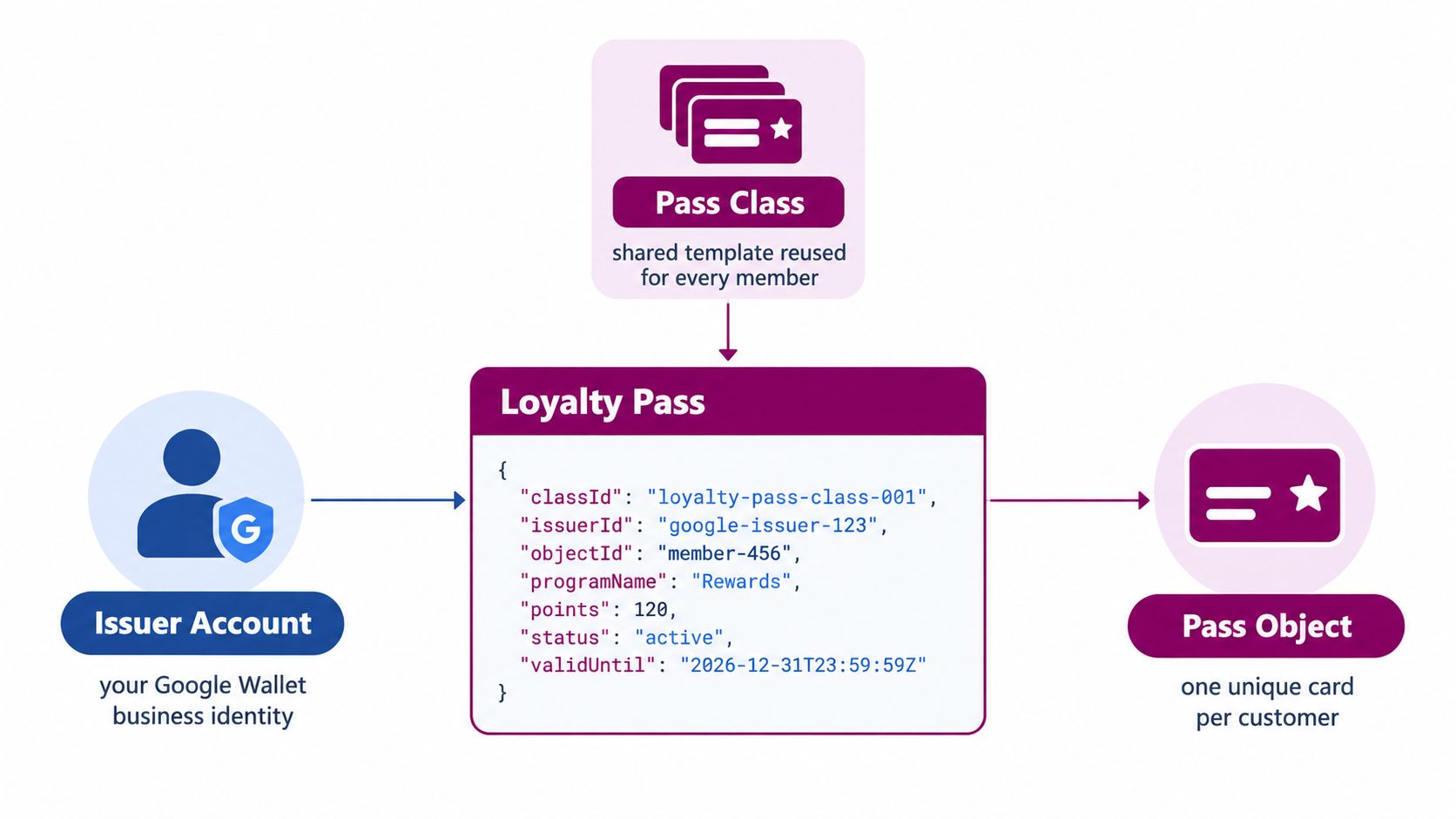
Use a neighborhood café as the example. The café first needs an issuer account, which represents its Google Wallet business identity. This is the account that creates and manages the passes.
Next comes the loyalty class. Think of it as the shared template for the café's program. It can contain the brand colors, logo, hero image, reward wording, field layout, and program-level settings. If every member receives the same style of card, the class stores the common structure once.
The loyalty object, sometimes called the pass object, represents one customer's card. It connects that customer to the shared class while carrying individual information such as a member identifier, current points, stamp count, or redemption status. The café creates a separate object for each member.
That structure prevents the merchant from designing every pass independently. The class defines what the program looks like, while the object records who owns a particular membership and what balance belongs to it.
What the merchant prepares
Before issuing cards, the café should define:
- The reward rules, including how customers earn and redeem.
- The card fields, such as stamps, points, tier, or member ID.
- The visual identity, including the logo, colors, and supporting imagery.
- The update path, which connects purchases or staff actions to the customer's pass.
- The distribution method, such as a QR code, checkout link, website button, email, or SMS.
The system then creates a signed Save to Wallet link. When a customer taps it, Google Wallet displays a preview and lets the customer confirm the addition. The customer doesn't need to install a separate loyalty app. The merchant's backend remains responsible for deciding when the card changes and sending that update to the right pass object.
What Happens When a Customer Adds the Card
The customer experience starts at a natural moment, usually while someone is paying. A café places a QR code beside the till, the cashier shares a link, or the business adds a Save to Wallet button to its website. The customer taps the link, reviews the pass, confirms the addition, and sees the card appear in Google Wallet.
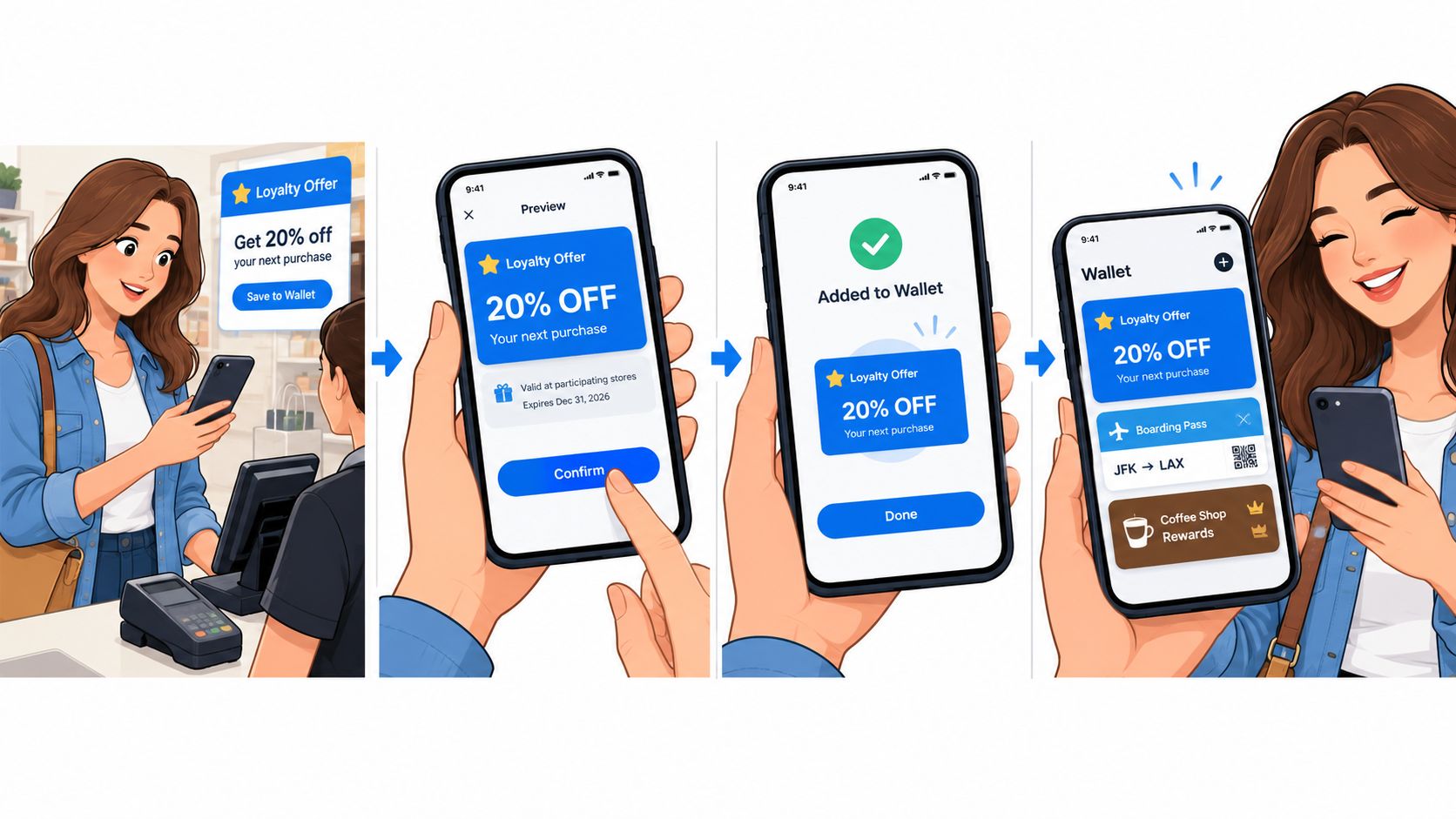
The pass can sit next to other stored cards and passes, so the customer doesn't have to remember a second login or search an app store. Google also documents account-level actions for loyalty passes, including viewing, searching, archiving, unarchiving, removing, and managing them from the app or website. That persistence makes the card easier to recover and maintain than a paper slip.
The first earning moment
Now consider the next purchase. The customer opens the pass or presents its barcode. The café identifies the member, validates the transaction, and records the earned stamp or points in its loyalty system. The merchant backend then sends the updated value to the relevant Google Wallet pass object.
Google documents programmatic updates through PUT or PATCH requests to the relevant loyalty resources in its guidance on loyalty-card updates. The customer's card refreshes with the new balance, so the customer can see progress without receiving a replacement card or manually entering anything.
The pass can also support notifications. A merchant might notify a customer when a reward becomes available, when a relevant offer is active, or when a pass should be revisited. Notifications shouldn't become a stream of generic promotions. They work best when they correspond to a real change in the account or a timely reason to return.
Why the API matters
The customer sees a simple card. The merchant is operating a lifecycle system:
- Issue: Create a pass object and distribute its Save to Wallet link.
- Identify: Match the pass with the customer or membership record.
- Update: Send new points, stamps, status, or offer information.
- Engage: Use relevant notifications or location-based triggers.
- Redeem: Confirm that the customer has met the reward rule and record the outcome.
That lifecycle is the difference between a pass that merely exists and one that supports repeat purchasing.
What the Pass Can and Cannot Do
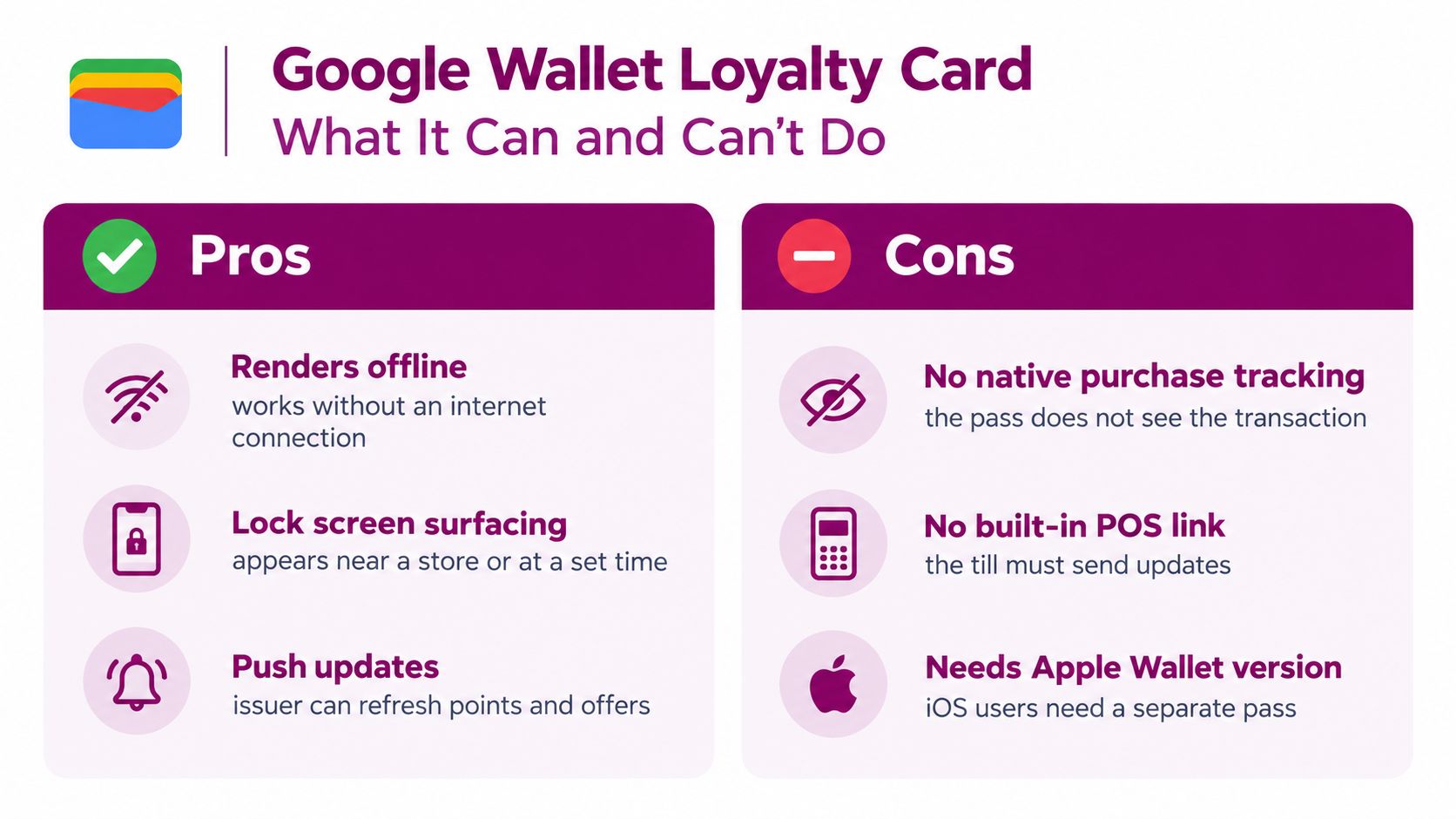
A Google Wallet loyalty card can render useful information on the device, including when the customer isn't connected to the internet. Google Wallet can also surface relevant passes through its notification and location-related capabilities. These features don't require the merchant to build a complete consumer-facing Android app.
The pass has a practical limit, though. It doesn't independently know that a customer bought a coffee. It doesn't decide whether a receipt is valid, calculate a reward from business rules, or reconcile a disputed transaction. Those jobs belong to the merchant's backend, point-of-sale workflow, or loyalty platform.
What the card handles well
A wallet pass is a strong delivery and display layer. It can show:
- A scannable identifier: The barcode or QR code helps staff find the member record.
- A current balance: The pass can display points, stamps, or another account field after an issuer update.
- Program information: Reward rules, locations, and merchant contact details can remain available to the customer.
- Status changes: A tier, offer, or reward state can change when the issuer sends new data.
- Relevant prompts: Wallet notifications and location-based surfacing can bring attention back to the pass.
What requires connected logic
The merchant still needs an operational system for the actions that create value:
- Purchase validation: Confirm that the transaction qualifies.
- Balance calculation: Decide how many points or stamps the customer earns.
- Fraud control: Prevent duplicated scans or unauthorized redemptions.
- Reward redemption: Mark the reward as used and update the account.
- Automation: Trigger a notification, offer, or expiry reminder at the right time.
A pass is therefore a passive vessel with an active issuer behind it. If a café wants automatic stamping from receipt validation, the receipt system must send the event to the backend. If a salon wants a reminder after a period without a visit, that timing logic must live in the connected loyalty system.
One further limitation matters for linked loyalty cards. Google notes that some linked cards may be online-only and may lack a barcode or card number in Wallet, which means they can't be used offline or in physical stores. Merchants should verify the intended redemption flow before promising that every pass behaves like a physical card.
Google Wallet vs Apple Wallet, Paper, and Apps
Every loyalty format makes a different trade between friction, reach, depth, and maintenance. The right choice depends less on which format looks most modern and more on how customers buy from you.
| Loyalty Format | Customer Friction | Device Coverage | Setup Cost | Ongoing Cost |
|---|---|---|---|---|
| Paper punch card | Very low at first use | Any customer willing to carry it | Low | Printing, replacement, manual handling |
| Standalone loyalty app | App download, registration, and updates | Android and iPhone through separate apps | Higher | App maintenance, support, and acquisition |
| Apple Wallet pass | Low for iPhone customers | Apple devices that support the pass | Moderate | Pass management and connected updates |
| Google Wallet pass | Low for Android customers | Android devices and markets where Wallet is available | Moderate | Pass management and connected updates |
Paper wins on immediacy. A cashier can hand over a card with no technical setup. The weakness is retrievability. A lost card can erase the customer's visible progress, and the merchant has little control over what the customer remembers to bring back.
Standalone apps offer more room. An app can combine ordering, payments, account history, loyalty, and branded content. It also asks for more commitment. Customers must install it, complete the onboarding, remember it, and keep it updated. That effort can make sense for a large, frequent-use program, but it may be excessive for a small business that mainly needs stamps and rewards.
Apple Wallet and Google Wallet sit between those options. They use native wallet environments rather than a separate loyalty destination. The two ecosystems have similar pass-oriented strengths, but they aren't interchangeable. A Google Wallet loyalty card doesn't automatically become an Apple Wallet pass, and an Apple pass doesn't reach Android customers. Businesses serving both audiences should plan for both formats, as outlined in this comparison of passes for Apple Wallet.
The honest choice is often a coverage decision. If your audience uses Android heavily, Google Wallet deserves a direct test. If your customers use iPhones, Apple Wallet matters just as much. If you need ordering or a social community inside the product, consider an app. If you need a retrievable reward balance with less friction, wallet passes are usually the more practical middle ground.
Deciding If a Wallet Loyalty Card Fits Your Business
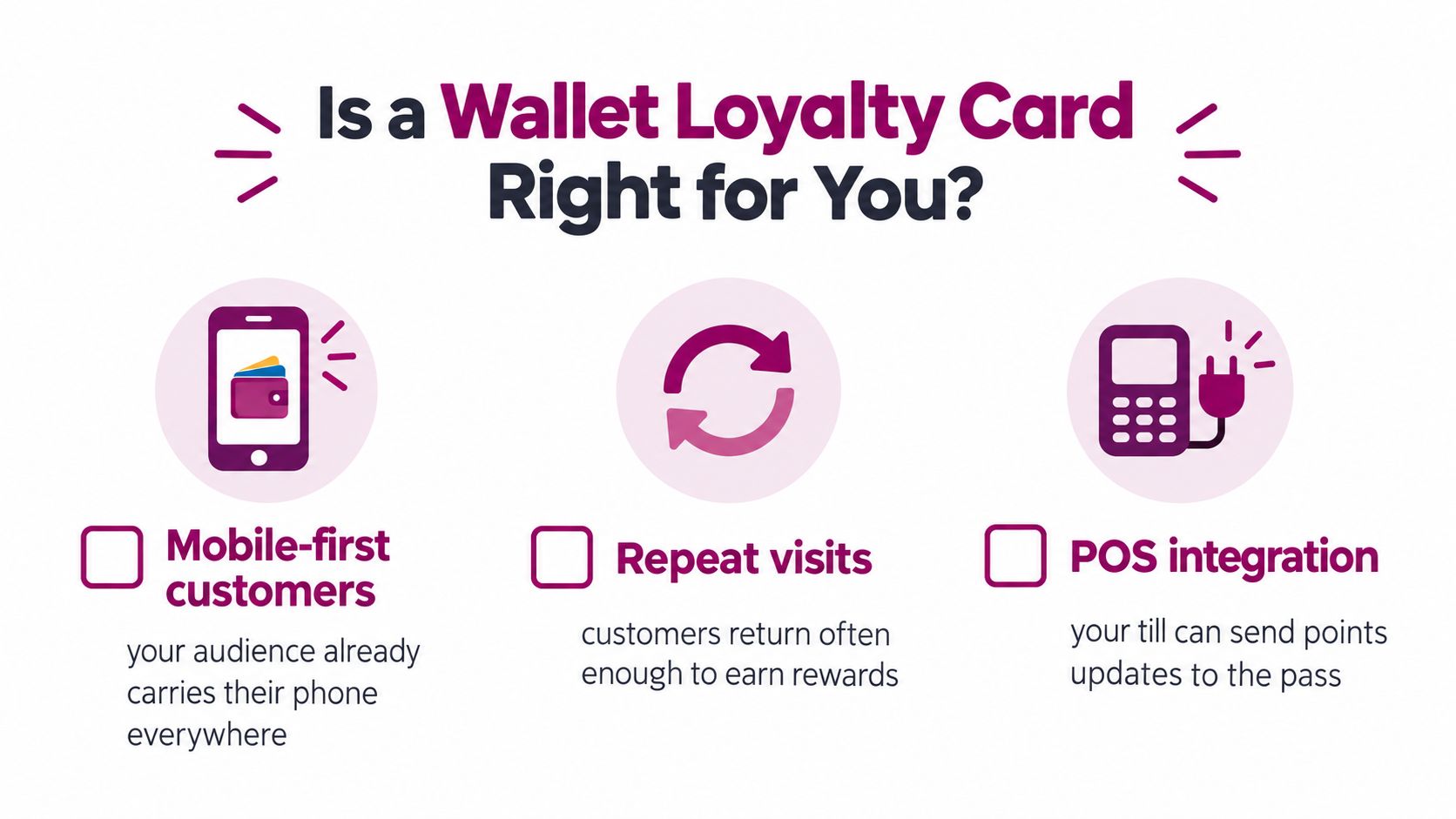
A Google Wallet loyalty card usually fits when three conditions meet:
- Customers return often enough for progress to matter.
- A meaningful share of the audience uses Android phones in markets where Google Wallet is available.
- The business wants a lightweight loyalty workflow rather than a full app ecosystem.
Coffee shops, bakeries, takeaway restaurants, independent grocers, barbers, salons, gyms, and local service businesses often match that profile. Their customers make repeat visits, the reward rules can stay simple, and staff can explain the program during an existing transaction.
Start with a fit check
Ask these questions before choosing a build path:
- Do customers need the reward frequently? A card that tracks a regular coffee habit has more natural value than one for a purchase customers make only occasionally.
- Can staff explain the action quickly? The add-to-wallet step should be easy to demonstrate at checkout.
- Can your till or loyalty tool identify the member? The pass can display a barcode, but another system must connect that identity to the transaction.
- Will both mobile ecosystems matter? A Google-only rollout won't serve iPhone customers, so decide whether you also need an Apple Wallet version.
- Do you need app functionality? Ordering, payments, account management, and rich content may justify a dedicated app. A simple points or stamp program may not.
Prepare before issuing
Write the reward rules in plain language. Decide what the primary field should show, gather the logo and brand colors, define the member identifier, and choose how staff will award stamps or points. Also create a recovery process for a customer who changes phones, loses access, or asks for a correction.
The implementation effort depends on the route. A turnkey platform can reduce technical work, while a direct Google Wallet API build requires issuer setup, pass design, issuance logic, update handling, and testing. Loyal Customer is one option that supports digital stamp cards and points programs, phone-based administration, and wallet-ready cards for Google Wallet and Apple Wallet. It also offers a free trial for businesses that want to test the setup before committing.
Before launch: Test the pass on the phones your customers actually use, not only in a developer preview.
The Real Question Is Engagement, Not Storage
Adding a pass to a wallet is an enrolment event, not a retention result. A customer can save a card and still forget the program, ignore notifications, or archive the pass after receiving irrelevant messages.
The competitive environment inside wallets is crowded. Forty-eight percent of consumers reported having four or more loyalty cards saved in digital wallets, according to independent commentary on Apple Wallet and Google Wallet loyalty in 2026. The implication is practical: your pass must earn attention after it earns a place.
Build a return loop
A useful Google Wallet loyalty card gives the customer a reason to open it or respond to it:
- A live balance: The customer sees progress after a qualifying purchase.
- A timely reward message: The pass communicates when a reward becomes available.
- A location-aware prompt: A relevant notification can appear when the customer is near the business, where supported by the wallet experience.
- An expiry reminder: A time-sensitive reward can create a clear reason to return.
- A visible redemption state: The customer knows what is available and what has already been used.
Google's partner case studies for Wallet passes include reported outcomes such as 100% member engagement, up to 12 hours saved per month in manual tracking, and 45% to 60% adoption in live deployments. These examples don't guarantee the same results for every merchant, but they illustrate where the value can appear: updates, triggers, and reduced administration, not storage alone.
Measure the handoff from save to use
Track the journey rather than stopping at the add event. Useful operational measures include:
- Notification opt-in rate, because an issuer can't rely on prompts that customers haven't enabled.
- Stamp-to-redemption ratio, which shows whether the reward rule produces completed outcomes.
- Time from add to first stamp, which reveals whether enrolment leads to a real visit.
- Update delivery success, which confirms that balance changes reach the right pass.
- Archived or removed passes, which can signal excessive messaging or weak relevance.
For design decisions, focus on the first screen. A customer should understand the reward, current progress, and next action without hunting through secondary fields. Guidance on designing a loyalty card can help shape that hierarchy, but the final test is behavioral. Do customers save the pass, use it, and redeem the reward?
Putting It All Together
A Google Wallet loyalty card is an updatable pass object backed by the Google Wallet API, not merely a paper punch card converted into an image. The customer gets a familiar reward record on the phone. The merchant gets a distribution and engagement surface that depends on a reliable system behind it.
Start this week by auditing your current loyalty program. Identify where cards disappear, where staff lose time, and where customers hesitate. Check how important Android customers are to your business, then choose between a direct API build and a third-party issuer platform based on your technical capacity and desired control.
During the first ninety days, prioritize the operating loop:
- Design the pass around one clear balance, such as stamps or points.
- Train staff on the add and redemption flow, including what happens when a customer changes phones.
- Connect updates to real transactions, so the displayed balance stays trustworthy.
- Measure save-to-use behavior, not just the number of passes issued.
- Test both wallet ecosystems if your audience includes iPhone customers.
Skip the temptation to spend most of the launch effort on decorative visuals. A polished pass can't compensate for slow updates, unclear rewards, or a barcode that staff can't use. Also, don't assume iPhone customers are unreachable. Google Wallet can become one part of a broader retention stack that includes Apple Wallet, email, SMS, and the in-store experience.
Loyal Customer lets consumer-facing businesses run points programs or digital stamp cards from a phone and issue branded loyalty cards for Google Wallet and Apple Wallet. Visit Loyal Customer to explore the wallet-ready approach and test whether it fits your next repeat-visit program.