You already know the scene. A customer reaches the counter, then pats every pocket looking for a loyalty card that was supposed to be there. The line slows, the reward gets skipped, and your staff has to decide whether to give the stamp anyway. That small moment is exactly where an Apple Wallet loyalty card earns its place, because it lives on the phone customers already carry, not in a stack of paper cards that vanish into bags, coats, and car seats.
For a cafe, salon, bakery, or takeaway, the appeal isn't abstract. It's the difference between “I forgot my card” and “it's right here on my phone.” And for you, the merchant, the key question is simpler than it sounds: what is this card, how does it stay updated, and what do you need to launch one without building a whole app? You can use the earlier guide on the digital punch card approach as a useful companion if you want the broader loyalty context.
Table of Contents
- Why the Paper Punch Card Is Losing
- What an Apple Wallet Loyalty Card Actually Is
- How a Loyalty Pass Looks Inside Apple Wallet
- How Pass Balances Stay Up to Date
- Benefits for Merchants and Customers
- How to Create and Issue Loyalty Passes
- Real-World Uses and Your Next Step
Why the Paper Punch Card Is Losing
A paper card works until it doesn't. The customer leaves it at home, washes it with a jacket, or gets a fresh one because the old one disappeared, and every one of those moments costs you repeat business. The card itself is cheap, but the friction around it is expensive.
That's why merchants keep moving toward wallet-based passes. An Apple Wallet loyalty card sits inside the Wallet app on the customer's iPhone, so it doesn't need to be remembered, stuffed, or replaced. Apple's Wallet framework has long supported store cards for loyalty, discount, points, and gift-card use cases, and Apple says the pass can automatically display fields like points, rewards balance, and terms and conditions. That matters because the reward becomes easier to see, easier to use, and harder to forget.
Why the merchant feels the difference
The biggest shift is operational, not visual. With paper, every update means reprinting or reissuing cards. With Wallet, the pass can change after it's already on the phone, which means the customer keeps the same card while the balance or message moves with it. Apple also notes that loyalty programs can be created as contactless passes, which removes pen-and-paper enrollment and makes sign-up feel much closer to a normal checkout step than a form-filling exercise.
A paper punch card is a reminder that customers had good intentions. A wallet pass is a reminder that your program is still there when they need it.
Apple has supported loyalty-card presentation in Wallet since 2015 through NFC-based redemption at payment terminals, which is the key reason this is not a novelty feature. It's a mature workflow that suits repeat-use businesses like cafes, salons, and retail stores, where the same customer comes back often and expects the process to stay fast.
If you're deciding whether this is worth your time, the answer depends on one thing. Do you want a loyalty system that customers can keep with them, or one that lives on paper until someone loses it? By the end of this guide, you should be able to judge that clearly.
What an Apple Wallet Loyalty Card Actually Is
An Apple Wallet loyalty card is a digital pass that sits inside the Wallet app instead of in someone's pocket. It behaves like a familiar plastic card at checkout, but it can be shown on a screen, scanned, or redeemed with NFC, and it doesn't get bent, stained, or forgotten in a wallet drawer.
Apple's own store-card pass type is built for loyalty, points, discount, and gift-card use cases. When you create one properly, Wallet can automatically show structured fields like points, rewards balance, and terms and conditions, so the card tells the customer what matters without requiring a separate app screen. That's the practical part most merchants care about, because the customer sees the state of the card where they already expect it.
Definition: An Apple Wallet loyalty card is a digital store-card pass that lives in Wallet, shows the customer's rewards state, and can be redeemed or updated without a separate loyalty app.
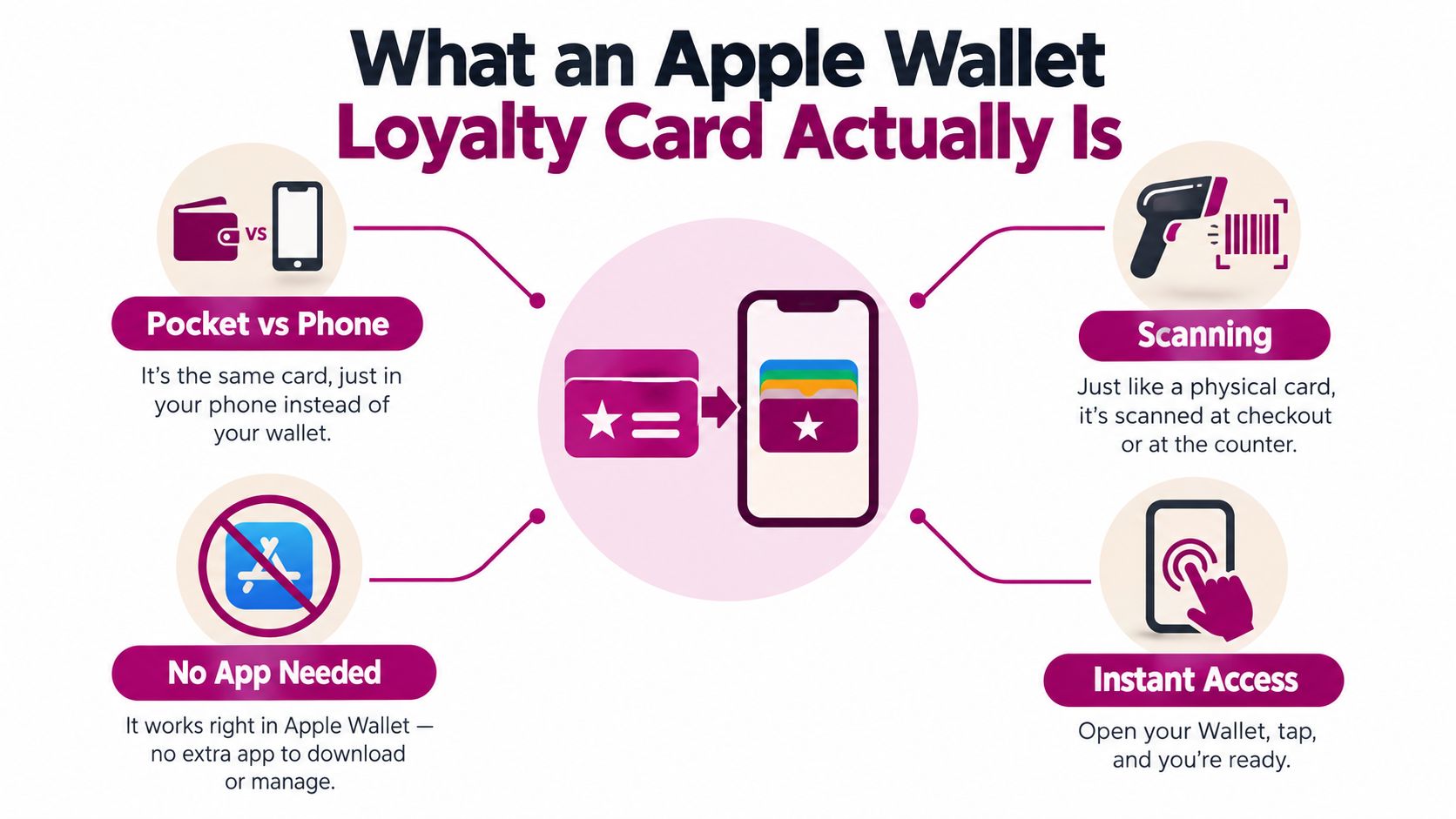
Apple first added loyalty-card support to Wallet in 2015 with NFC-based presentation to payment terminals, which is why this fits into checkout instead of sitting beside it. The customer doesn't have to open a separate loyalty app, and your staff doesn't need to handle a second membership system just to register a visit. That combination is what made wallet passes practical for businesses that see the same people every week.
It works like a paper card that never gets lost. The difference is that the card can be refreshed, it can show the current balance, and it can be presented from the lock screen when the phone is near the store, depending on how the pass is configured. For a cafe owner, that means the loyalty card can show up at the exact moment the customer is ready to order, not buried in a cluttered wallet or forgotten at home.
How a Loyalty Pass Looks Inside Apple Wallet
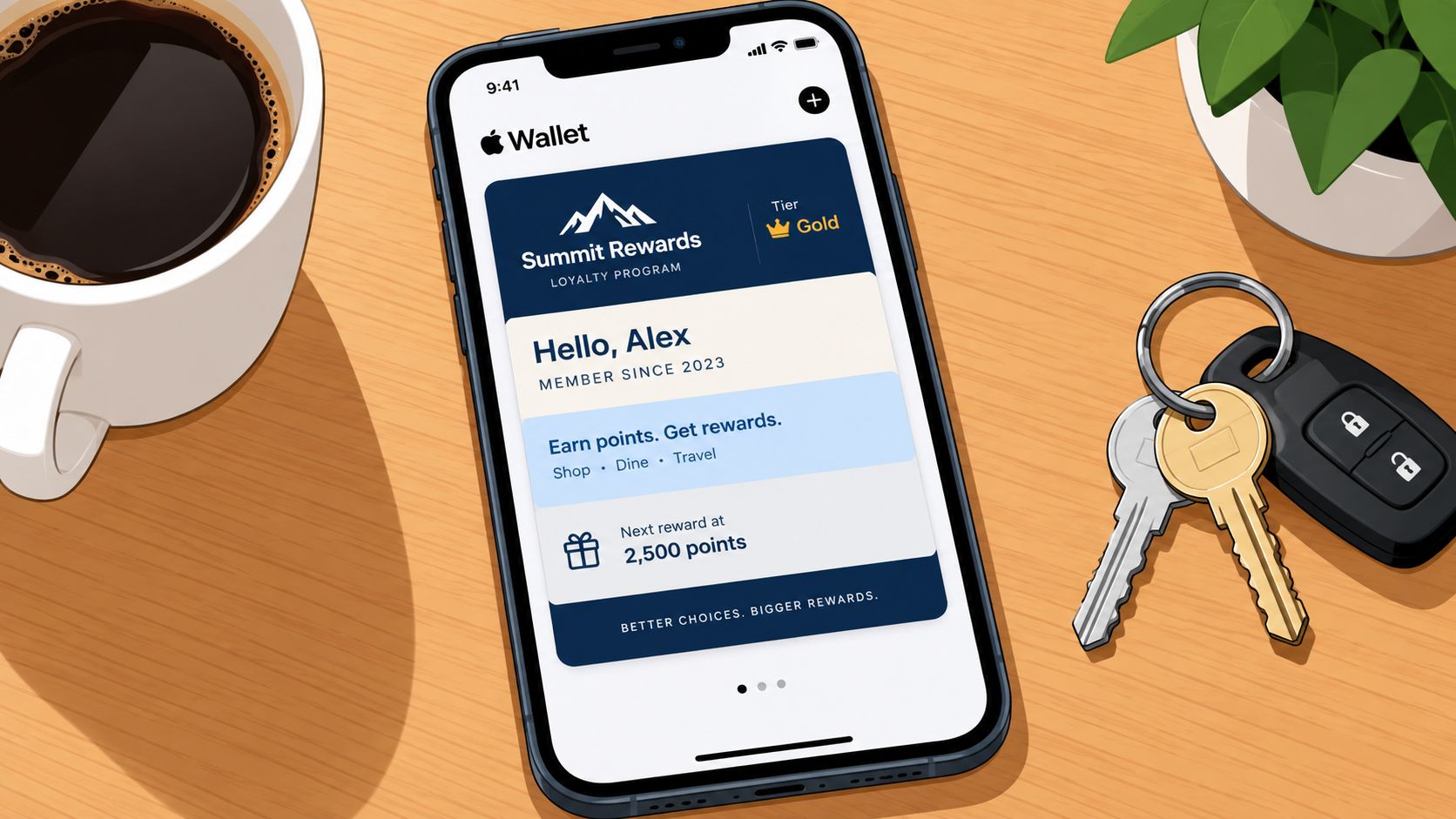
The Wallet screen is not a blank canvas. Apple organizes passes into fixed visibility tiers, including logo, header, primary, secondary, auxiliary, footer, and back fields. That structure is the reason pass design matters, because customers don't see every detail at once. They see the most important detail first.
For a loyalty card, the rule is simple. Put the main balance, stamp count, or progress marker in the primary or header field so it stays visible when the card is collapsed. Put fine print, terms, and secondary notes in the back fields, where they won't clutter the view. Apple's Wallet layout is built around structured information, not decorative freedom, so the card works best when you respect that hierarchy.
What should stay visible
A cafe owner usually cares about one number, how close the customer is to the reward. A salon may care more about points balance or visit count. In both cases, that top-line metric belongs where the customer can see it with one glance, not buried under terms. That is the practical advantage of Wallet over a paper card, where everything gets printed flat and nobody controls what stands out.
How to think about the layout
A useful mental model is to sketch the pass in layers:
- Top layer: your brand mark and the one number customers check first.
- Middle layer: supporting details like visit count or rewards status.
- Lower layer: anything that helps staff or clarifies the offer, such as terms.
- Back side: long-form notes, restrictions, or less urgent information.
Practical rule: if a customer needs to ask what the balance is, the balance is in the wrong field.
Apple also says pass updates can surface through push notifications or a pull-to-refresh gesture, which means the layout can stay simple while the data behind it changes. For a merchant, that's the win. You don't have to cram every bit of loyalty logic onto the front of the pass, only the information that should always be visible when the customer opens Wallet.
If you want a simpler way to think about pass design, the merchant-friendly breakdown at passes for Apple Wallet is a useful reference point. Keep the important number in front, keep the explanation behind it, and don't waste the front of the card on text nobody reads at checkout.
How Pass Balances Stay Up to Date
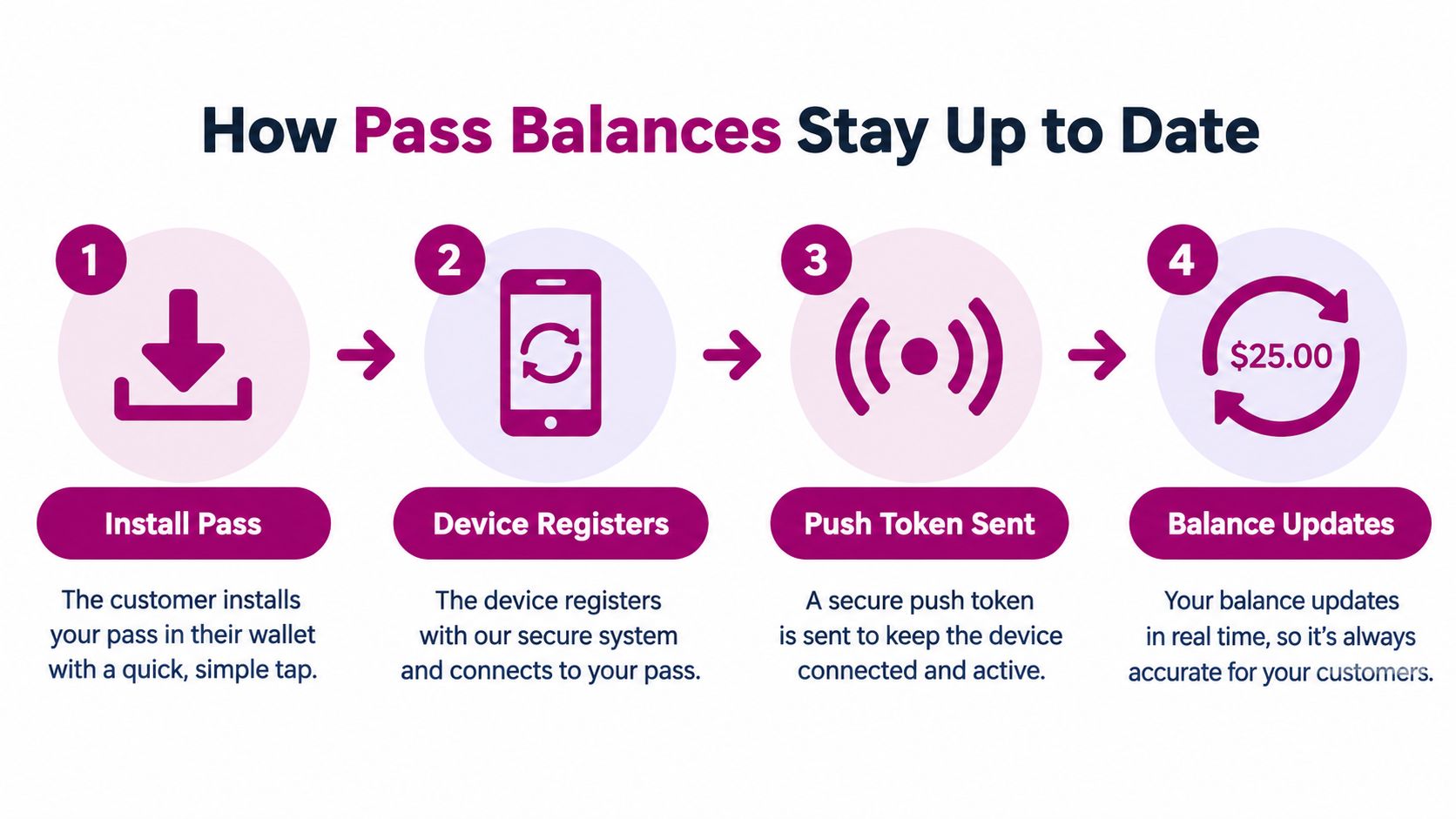
This part confuses a lot of merchants because the phone feels magical when the balance changes, but the process is straightforward. After a pass is installed, the customer's device registers the pass with the issuer's web service and receives a push token. When you change the balance or any other pass data, your server sends a push notification, and Wallet fetches the updated pass from the server.
That means the push message is only a trigger. The actual pass state is not stored in the notification itself, it's pulled from your system. Apple explicitly documents that the push uses the same signing certificate and private key as the original pass, and that the update payload is an empty JSON object, so the notification says “check for an update” rather than carrying the new balance inside the alert.
What this looks like in day-to-day use
A customer buys a coffee, your staff records the visit, and the count changes on your side. Minutes later, the pass on the customer's phone reflects the new state the next time Wallet updates it. That's the merchant experience in plain language, the server pings the phone, Wallet fetches the new balance, and the customer sees the updated card without reinstalling anything.
Apple also says pass updates can surface through a pull-to-refresh gesture. That gives customers another way to pull the latest state without leaving Wallet or opening a separate app. For a business owner, the point is not protocol detail. The point is that loyalty can stay current without a custom consumer app sitting on the phone.
The customer should never wonder whether the card is stale. If the pass is built correctly, the new count appears as part of normal Wallet behavior.
Why this matters at the counter
You don't want staff explaining how to refresh a loyalty app. You want them to stamp a visit, trust the system, and move to the next order. Wallet's update flow is built for that kind of routine use, which is why it suits cafes, salons, bakeries, and retail counters that need a fast handoff between the register and the phone.
The best way to picture it is this. You update the customer's reward state on your side, and Wallet keeps the customer's copy aligned. No separate app maintenance, no manual balance text messages, and no paper card that needs replacing the moment the stamp squares fill up.
Benefits for Merchants and Customers
The value of a wallet pass is different on each side of the counter. For customers, it removes the need to download another app or remember another card. For merchants, it cuts down on reprinting, replacement, and the little follow-up tasks that pile up when a program lives on paper.
The customer side is easy to explain. The pass stays on the device they already use, and it's ready to present during checkout. The merchant side is more practical. A digital pass can be updated without reissuing physical cards, and a wallet-native setup avoids the awkwardness of asking every regular to carry another piece of plastic.
Paper punch card vs Apple Wallet loyalty pass
| Aspect | Paper Punch Card | Apple Wallet Loyalty Pass |
|---|---|---|
| Cost to keep running | Reprints and replacements are common | Updates happen digitally |
| Loss risk | Easy to forget or misplace | Lives on the customer's phone |
| Enrollment friction | Manual handoff at the counter | Adds through Wallet, no separate app |
| Balance updates | Staff must stamp or rewrite by hand | Pass can update after the server refreshes |
A wallet pass still has limits. It doesn't solve weak rewards, and it doesn't make a confusing offer easier to understand. If your reward is hard to explain, the medium won't fix that. The pass just makes a clear loyalty program easier to carry and harder to lose.
Merchant lens: a wallet pass reduces friction only when the reward itself is simple enough to understand in one glance.
Apple's documentation also notes that passes can appear on the lock screen based on time and place relevance, which helps repeat-use businesses stay visible near the moment of purchase. That's useful for a coffee shop or salon because the reminder shows up when the customer is near the location, not hours later in an email inbox. The pass becomes part of the visit, not an extra task before it.
How to Create and Issue Loyalty Passes
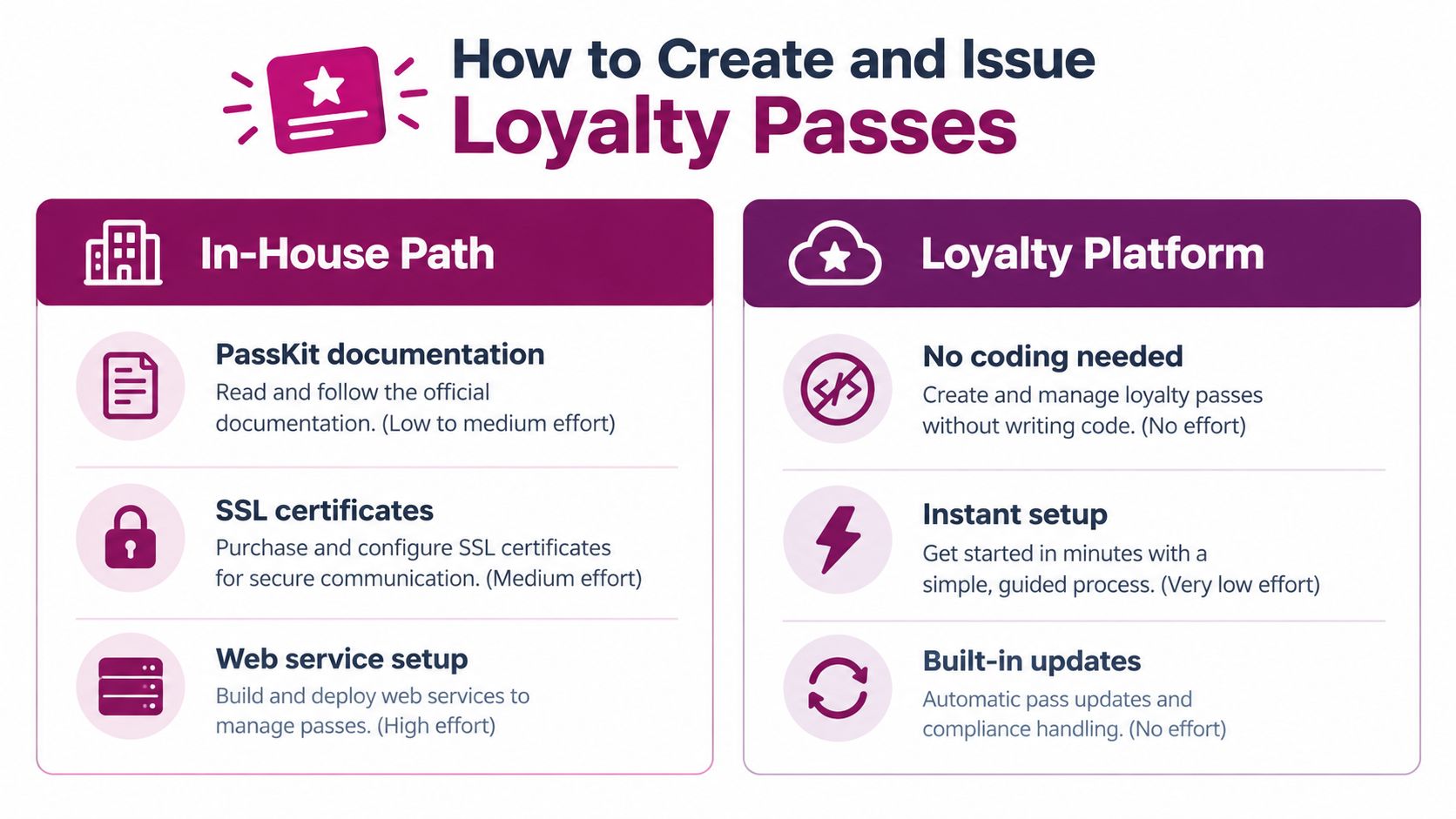
A cafe owner can create an Apple Wallet loyalty pass in two ways. You can build the system yourself with Apple's PassKit tools, or use a loyalty platform that manages the technical work. The choice is less about making a card and more about deciding who will keep its balance accurate after each customer visit.
The build-it-yourself path
A pass is like a paper card that needs a reliable back office. If you build in-house, Apple's documented setup includes a signing certificate, a web service that registers each installed pass, push infrastructure, and logic for changing the pass after a purchase or redemption.
That work continues after the first pass is issued. Your system must know which customers installed which passes, send update notifications, and publish the latest balance. If a customer earns a stamp but the phone still shows the old total, the digital card quickly loses trust.
This route suits a business with developer support and a clear reason to own the full process. For a cafe owner already managing staff, stock, and service, it can become another system to maintain. The task is not only designing the card. It is keeping the update mechanism working while customers continue to use it.
The platform path
A loyalty platform takes care of much of that technical plumbing. Loyal Customer is one option in this category; it lets merchants run a points program or digital stamp card from a phone and issue wallet-ready passes for Apple Wallet and Google Wallet. The setup also includes a free trial, so you can test the customer and staff flow before a wider rollout.
You set the reward rules, create the card, and issue it. The platform handles pass generation and updates underneath. For a small business, that means spending time on the offer and redemption process instead of certificates, registration services, and push notifications.
If you have never set up a loyalty program, the guide on how to start a loyalty program covers the decisions to make before issuing passes.
A simple decision checklist
- Choose in-house if a developer can maintain certificates, the web service, and pass updates.
- Choose a platform if you want to launch a points or stamp program from a phone without managing that infrastructure.
- Choose both wallets together if Apple and Android customers should receive the same loyalty experience.
- Test before rollout if you want to check the card, balance updates, and redemption process in real use.
For a small merchant, the practical question is how you want to spend your time. Building a pass may be possible, but a platform can get the program running sooner while its underlying system handles ongoing maintenance.
Real-World Uses and Your Next Step
A coffee shop usually needs the simplest version, a stamp card where every visit moves the customer closer to the reward. The key is not to overcomplicate it. Put the stamp count in the primary field, keep the offer short, and let the customer see progress at a glance when they open Wallet or stand at the counter.
A salon often works better with points, because visits are less frequent and the spend per visit is higher. A takeaway can use the same pass mechanics in a different way, sharing the join link through WhatsApp or a QR code near the till so the customer adds the pass before they leave. A bakery can do the same at the counter, where the card is easiest to explain during a busy morning rush.
Matching the pass to the business
- Cafe: use a stamp card, keep the count visible, and make the free item easy to understand.
- Salon: use points or visits, and show the current balance where customers can see it quickly.
- Takeaway: share the card link digitally, then let the pass carry the reward state afterward.
- Bakery or tea shop: place the wallet card next to the checkout prompt so the sign-up feels natural.
The same rules keep showing up because the same mechanics are doing the work. The field layout matters, because the balance has to be visible. The update flow matters, because the card has to stay current. Lock-screen relevance matters, because the reminder has to land near the moment of purchase.
Start with the reward you can explain in one sentence. Then design the pass so that sentence is reflected in the first thing customers see.
If you're ready to test the idea, pick the model first, points or stamps. Then decide what belongs in the primary field, and use a free trial to see how the issuance flow feels in practice before you commit to a full rollout.
Loyal Customer gives merchants a way to run points programs and digital stamp cards from a phone, then issue wallet-ready passes for Apple Wallet and Google Wallet. If you want to see how that fits your shop, visit Loyal Customer and test the setup with a free trial before you launch it at the counter.