Wallet-pass enrollment has been reported at 65–75% of enrolled customers, compared with 10–20% for standalone-app downloads, according to vendor-reported benchmarks rather than controlled trials in Flyx's comparison of loyalty apps and wallet passes. That gap reframes the question for a small business: the cheapest format to launch may not be the one customers are most willing to keep using. Choose based on the effort customers must make, the control you need over rewards, and the trust your data practices earn.
A standalone app gives you the most room for custom features, but asks customers to download and manage another app. A wallet pass reduces that hurdle by putting a digital loyalty card in Apple Wallet or Google Wallet. A phone-operated system lets staff manage stamps or points from a phone, with customers identified by a QR code, phone number, or printed code.
Table of Contents
- Three Rewards Card Formats Side by Side
- How Many Customers Actually Join Each Format
- Setup, Updates and Redemption Requirements
- Cost and Integration Trade-offs
- Privacy and Trust in Each Format
- Rewards Customers Reach Before They Lapse
- Pick a Format for Your Business and Test It
Three Rewards Card Formats Side by Side
| Criterion | Standalone app | Wallet pass (Apple or Google) | Phone-operated system |
|---|---|---|---|
| Customer install | Full app download and account | Pass added to Apple Wallet or Google Wallet, no app download | Usually none, QR code or phone-number check-in |
| Where the balance lives | Brand's app servers | Issuer's server, with updates sent to the pass | Merchant's phone or cloud dashboard |
| How updates reach the customer | Customer opens the app or responds to a push notification | Server-triggered pass refresh on Apple, or direct member update on Google | Balance is visible at the next check-in |
| Redemption at the counter | In-app barcode or QR code | Barcode or QR code on the pass; NFC is optional | Staff confirms the balance on a phone or by lookup |
| Works without a smartphone | No | No | Partly, if the customer uses a printed code |
| Best fit | Brands with frequent buyers who want app features | Cafés, salons, and micro-merchants wanting low-friction access | Very small sellers testing a program or selling through Instagram or WhatsApp |
Mobile participation already matters to loyalty programs: Antavo's 2025 Global Customer Loyalty Report found that 59.0% of surveyed consumers preferred interacting with a loyalty program through a mobile app, while 69.8% said they joined to obtain rewards, discounts, or cashback, according to Antavo's report. Those preferences point toward a practical requirement: make joining, checking a balance, and redeeming a reward quick.
The three formats can overlap. A wallet pass can be issued and managed through a phone-operated system, so the decision isn't merely “app or no app.” It's where the customer's card lives and who has to maintain the software and balance. Loyal Customer runs points and digital stamp programs from a phone and issues Apple and Google Wallet passes, placing it between the wallet-pass and phone-operated formats.
How Many Customers Actually Join Each Format
One vendor comparison puts wallet-pass enrollment at approximately 65–75% of enrolled customers, compared with 10–20% for standalone-app downloads. It also reports wallet-pass installation above 60% on iOS and 45% on Android when customers receive a clear checkout or confirmation flow. These are vendor-reported benchmarks, not controlled trials. Treat them as directional evidence: a wallet pass asks customers to take fewer steps, while an app may give the merchant more control over the customer experience but lose people at the download stage.
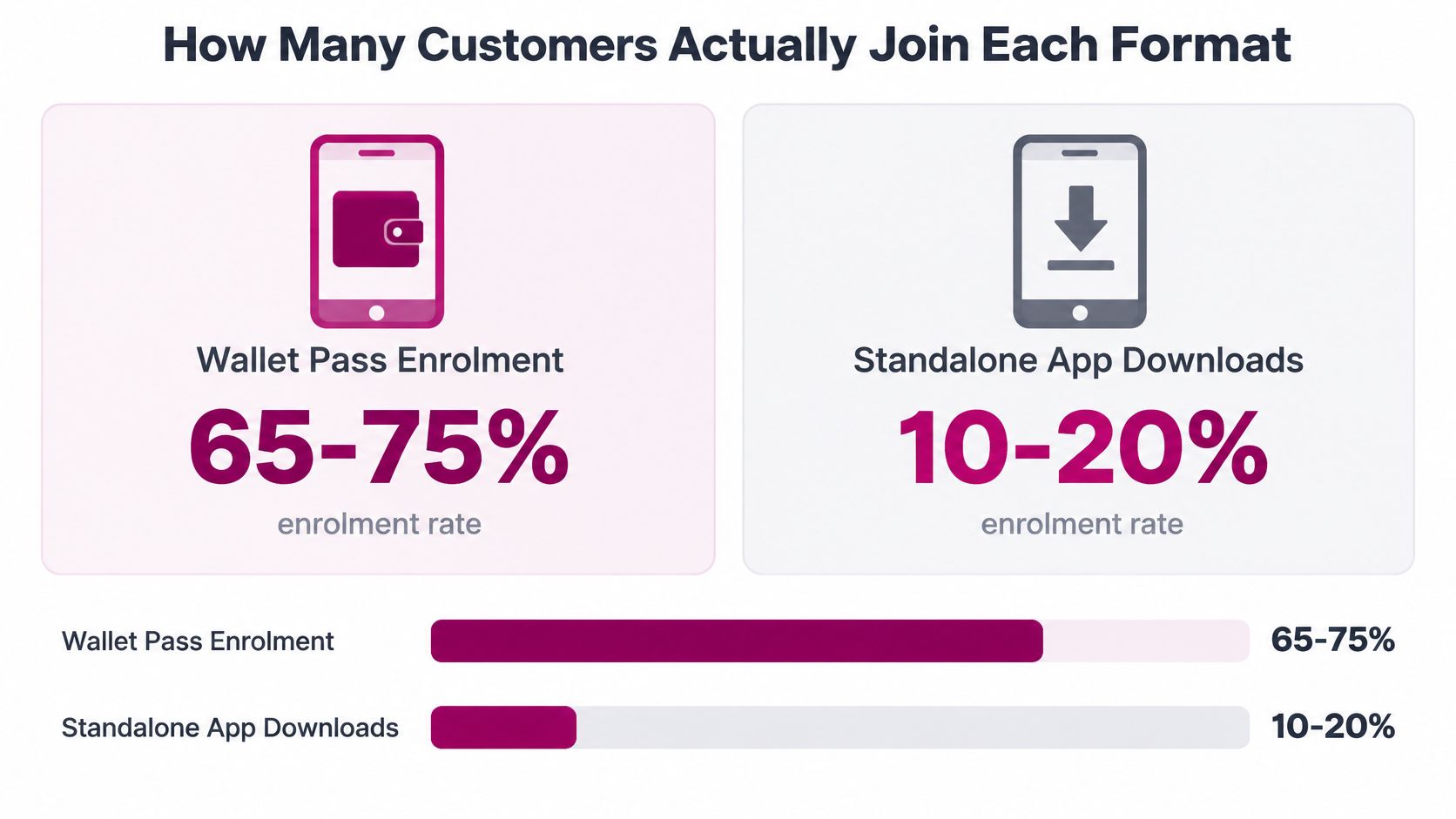
The same comparison reports that more than 90% of pass users retained the pass after 12 months, versus roughly 32% retention for downloaded apps. A separate vendor analysis cited on that page reports three to four times as many active users at day 90 after businesses moved from app-centric loyalty to wallet passes. These figures suggest lower ongoing friction for passes, but they do not predict your results. The offer, staff explanation, customer mix, and sign-up flow all affect whether people join and continue using a program.
Track use, not just registrations
A registration count cannot show whether customers find or redeem their rewards. Track four measures:
- Pass-add rate: Customers who add the pass divided by customers invited to add it.
- Day-90 active-pass rate: Pass holders who still interact with the program at day 90, using one consistent definition of “active,” such as a balance check or recorded visit.
- Redemption rate: Members who redeem a reward divided by members who earn one.
- Update-delivery rate: Pass updates successfully delivered divided by updates attempted.
Break results out by iOS versus Android and by acquisition channel. A QR code at the till, an SMS link, and an email invitation reach customers at different moments and with different levels of intent. Looking at the combined total can conceal a weak channel.
For example, if 100 customers see a checkout QR code and 60 add the pass, the checkout add rate is 60%. For an SMS offer, record the same measures: 100 SMS recipients, 42 pass adds, a 42% add rate. Comparing checkout at 60% with SMS at 42% gives you a practical test: revise the SMS message or timing, then measure the result using the same method.
Setup, Updates and Redemption Requirements
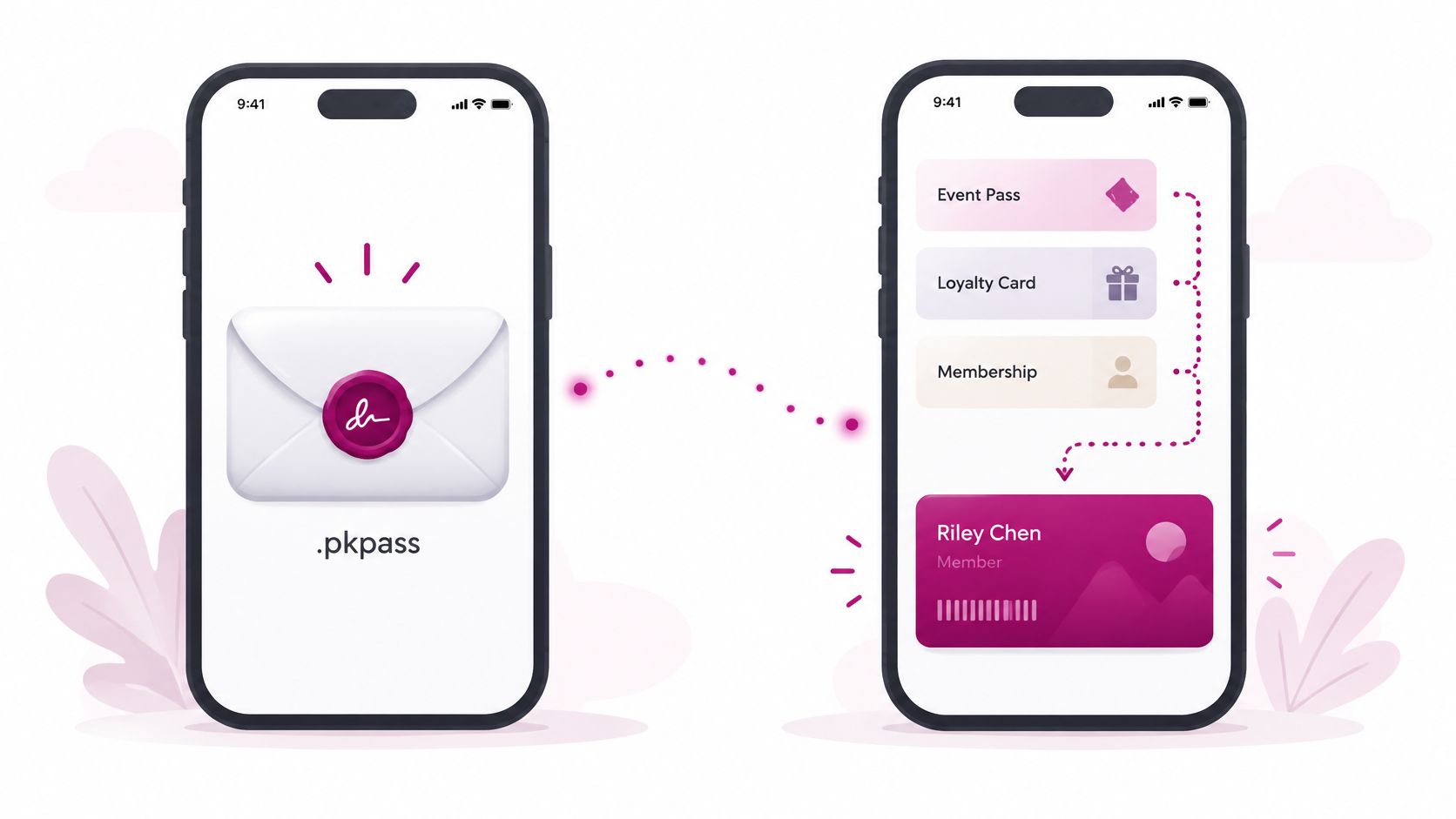
A wallet pass avoids the work of building and maintaining a separate customer app, but it still needs a reliable system behind it. Apple Wallet uses a signed .pkpass package; Google Wallet uses an API model with a reusable Class template and a member-specific Object. Both let the issuer update points, tier, balance, or expiry without asking the customer to reinstall anything, as explained in Brandmovers' overview of mobile-wallet loyalty.
The update mechanisms differ. Apple generally sends a server-triggered notification, then refreshes the pass. Google updates the member's Object directly. For a small merchant, the working pattern is straightforward: issue the pass through a QR code or link, keep balances in a central system, and show a barcode or QR code when the customer redeems.
Choose the redemption method your counter can support
| Redemption method | What the merchant needs | Setup effort | Fit for small merchants |
|---|---|---|---|
| Barcode or QR code on the pass | Scanner or phone camera and pass-issuing software | Low | Strongest starting point |
| Phone-number or account lookup | Staff device with the loyalty dashboard | Low | Good when customers already give a number |
| Printed or shared code | Printed sheet or message template | Very low | Useful for Instagram or WhatsApp sellers |
| NFC tap (Apple VAS or Google Smart Tap) | Certified terminals, compatible POS software, and platform certification | High | Enterprise upgrade path, not a baseline |
NFC can make checkout feel effortless, but it adds requirements that a basic rewards program doesn't need. Apple's VAS flow requires Apple certification, compatible terminals, and supporting POS software; Google Smart Tap also needs certified terminals and compatible POS processing.
Practical rule: Launch with barcode or QR redemption. Test real balance changes on both iOS and Android, then consider NFC only if checkout volume and existing equipment justify the added setup.
Cost and Integration Trade-offs
The visible launch fee is only part of the cost. Staff time spent fixing a failed scan, answering questions about a lost login, or correcting a balance can make a seemingly inexpensive program expensive to run. A POS integration may also become necessary as transaction volume grows, even if it isn't needed for the first launch.
A standalone app carries the broadest ongoing workload. You need iOS and Android builds, app-store submissions, release reviews, and support for both operating systems as they change. You're also asking customers to install, sign in, and keep another app current. Those steps can make sense when app-specific features, such as order-ahead, are central to how people buy from you. They're hard to justify if the app mostly displays a points balance.
A wallet pass skips app builds and app-store releases. You still need pass templates, a way to issue passes, and a central place to store balances. The trade is lighter customer installation for ongoing work to keep pass details and reward balances accurate.
Budget for the work after launch
A phone-operated system is often the lightest way to test a basic stamp or points offer: configure a card and use a phone to look up or update members. But relying on one device can slow the counter, and the system may not award points automatically through your POS. If you're comparing providers or approaches, this guide to loyalty program software can help you make a practical feature and cost checklist.
Build a 12-month estimate for each format. Include the launch work, staff time for routine updates, support for failed scans or account access, and any integration you expect to need. If you can't yet quantify an item, mark it unknown rather than treating it as free. Comparing only setup fees rewards the format with the smallest initial invoice, not necessarily the format that takes the least effort to keep working.
Privacy and Trust in Each Format
Easy enrollment does not guarantee trust. In PwC's 2025 US Customer Experience Survey, 53% of consumers said sharing personal information is worthwhile when it makes brand interactions smoother, while 93% said mishandling their data would cause them to lose trust. These figures point to a practical trade-off: customers may accept data collection when its purpose is clear, but poor handling can undermine confidence. See PwC's customer experience survey.
A rewards-card program should answer three questions before asking for details: What do you collect, why do you need it, and what does the customer get in return? Separate information needed to run the program from optional details, and explain the difference plainly.
Ask only for what the program needs
Collect enough information to identify a member and record purchases or visits that change their balance. A phone number or email address may be enough for that purpose. Birthdays, preferences, and location are optional for a basic stamps or points program. Mark them optional at enrollment, and let customers earn rewards without providing them.
The format affects control and perceived effort. A wallet pass sits on the customer's device, while the merchant's system maintains the balance. Explain whether getting or using the pass requires a separate account. A standalone app gives the business a brand-specific experience, but asks customers to install it and manage an account. A paper card collects no customer data, though staff may have no easy way to confirm that it belongs to the person presenting it. For the practical differences between digital wallets and mobile wallets, clarify which kind of wallet experience your program offers.
Make account removal just as clear as enrollment. Tell customers how to close or delete their loyalty account, whether removing a pass from a phone also affects the balance, and what happens to their information after they leave. Clear answers help customers judge the exchange: what data the program needs, what remains under the merchant's control, and what they can remove themselves.
Rewards Customers Reach Before They Lapse
A reward's real cost to the customer is the number of visits it takes to reach it. At an assumed $7.50 average spend per visit and one point per dollar, each visit earns 7.5 points. Divide the points needed for the reward by 7.5 to estimate the visits required, then compare that threshold with how often your customers realistically return.
| Program design | Earn rule | Visits to first reward | Lapse risk |
|---|---|---|---|
| 10-stamp card | 1 stamp per visit | 10 visits | Low if stamps never expire |
| Points, low threshold | 1 point per $1, reward at 100 points | About 14 visits | Medium if points expire |
| Points, high threshold | 1 point per $1, reward at 500 points | About 67 visits | High for occasional buyers |
| Points, 300-point reward with six-month inactivity expiry | 1 point per $1, reward at 300 points | About 40 visits | High; balance can lapse before the reward |
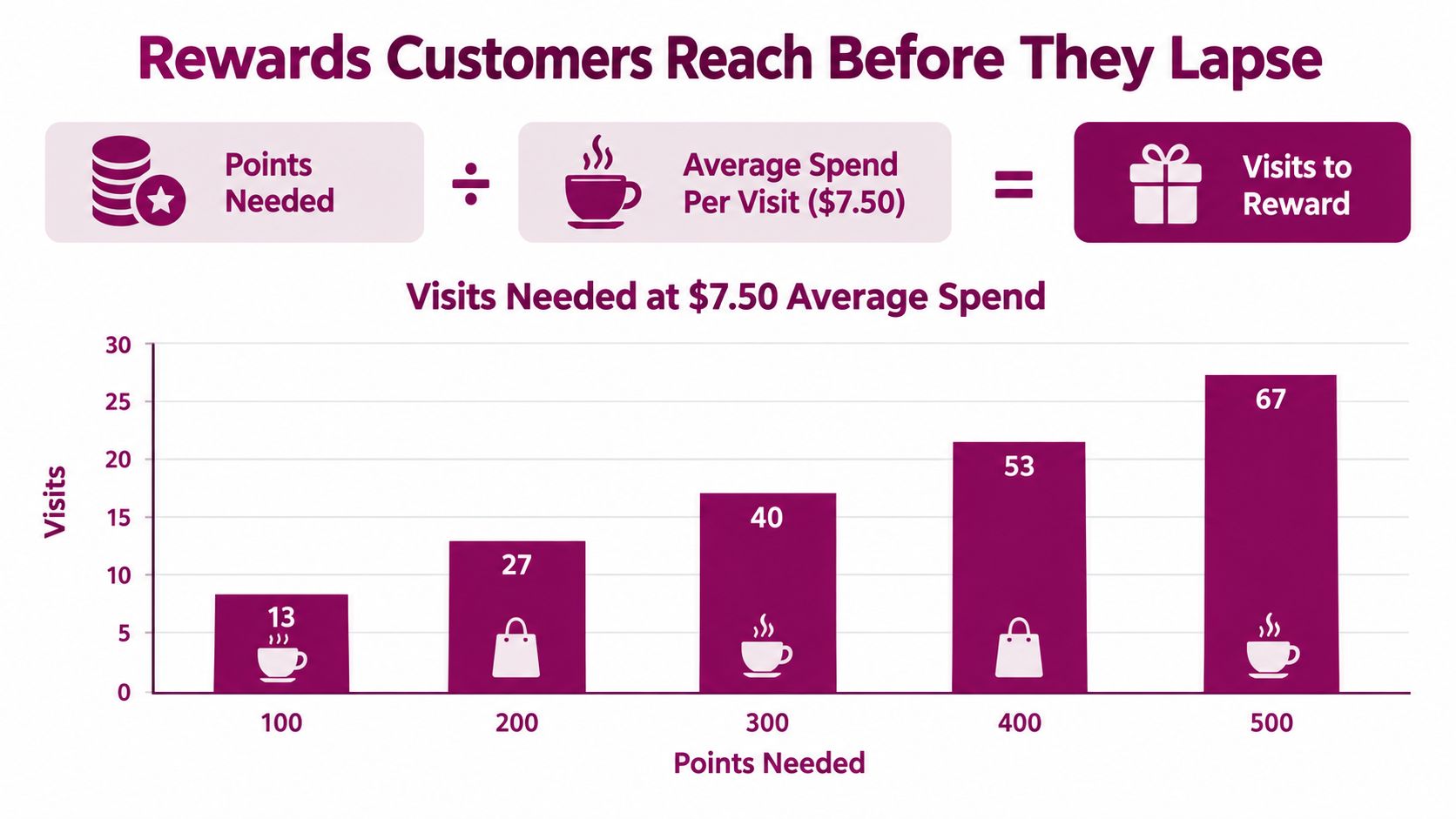
A six-month inactivity rule can wipe out the value of a 300-point reward before an occasional customer gets there. The reward may look attainable on a card while remaining out of reach for someone who visits only now and then. That's a design problem, not a pass-display problem.
Digitas and Fetch's 2025 research found that 81% of active US loyalty users rated speed to rewards as critical to retention, 87% said ease of use was critical, and 40% abandoned programs when rewards took too long to earn. The same brief reports that global 2025 research found 40.7% of consumers wanted points not to expire, while 40.0% wanted more ways to earn, in Digitas and Fetch's loyalty research.
Tell customers about expiry and inactivity rules when they join, and send a reminder before rewards disappear. For occasional customers, a modest reward they can reach in a few visits may work better than a large payoff that feels distant. Compare points and stamps against the way people really buy: points suit varied baskets, while stamps make a visit-based reward easy to understand.
A visible balance can help customers follow progress, but it can't make an unattainable reward attractive. Set the earning threshold first, then choose how the customer will see it.
Pick a Format for Your Business and Test It
Match the reward mechanic to the way customers return. A café with similar purchases and frequent visits has a different loyalty problem from a salon with booked appointments or a retailer with baskets of varying sizes.
| Business situation | Recommended format | Why it fits | What to avoid |
|---|---|---|---|
| Café or bakery with frequent, similar visits | Wallet pass with stamps or points | Low friction at the counter; a stamp reward can be reachable in about 10 visits | Requiring an app download |
| Hair or beauty salon with booked appointments | Wallet pass with spend-based points | Repeat visits make a persistent balance useful between appointments | Tiers with distant rewards |
| Restaurant or takeaway with online ordering | Standalone app if order-ahead is central; otherwise a wallet pass | App features justify a download only when repeat volume supports them | Building an app before a repeat customer base exists |
| Gym or studio with memberships | Wallet pass counting visits or classes | Check-ins map directly to stamps | Expiry rules that conflict with membership terms |
| Micro-merchant selling via Instagram or WhatsApp | Phone-operated system with a wallet pass or printed code | No app build is needed to start | Scanners and POS integrations you don't yet need |
| Independent retail or grocery with varied baskets | Points program in a wallet pass | Spend-based points suit different basket sizes | Stamp cards that ignore basket size |
Run a small test before adding features
Choose one format and one reward. Set a first reward that a typical customer can reach within about 10 visits. Start with a clear offer rather than tiers, bonus days, and multiple redemption options.
Offer it in two places. Show the pass at checkout and send it by SMS. Track add rates separately for each channel and for iOS and Android, so you can see where customers stop.
Run the program for 30 days. Record the day-30 active-pass rate and redemptions. A sign-up count tells you who added a pass, but not whether the reward fits the buying routine.
Test real updates on both phone platforms. Add points or stamps, then confirm the pass displays the changed balance. Test a redemption too, so staff can follow the process without improvising at the counter.
Expand only when the basic flow holds up. Add a second acquisition channel or a richer reward after the pass, balance updates, and redemption process work reliably.
Starting with a simple format keeps the test focused: you're checking customer effort, staff workload, and reward appeal before investing in more features. Loyal Customer offers phone-operated points and stamp programs, Apple and Google Wallet passes, and a free trial for businesses to test the setup.
Try the free trial to configure one stamp or points offer, issue wallet passes, and test the customer flow before committing to a broader program. Visit Loyal Customer to see whether its phone-based setup fits your business.