The popular advice is that digital wallets and mobile wallets are the same thing. That shortcut works for a vocabulary quiz, but it fails when a café wants to issue a loyalty pass, a salon needs to protect a points balance, or a retailer has to decide whether a customer's phone should hold money or merely display a reward credential.
The useful question isn't just which label sounds correct. It's where the wallet is accessed, what it does, and whether it stores value. Those three decisions affect the customer experience, the merchant's technical setup, the handling of disputes, and the kind of loyalty pass a business should issue.
For small merchants, the distinction has a practical outcome. An Apple Wallet or Google Wallet loyalty card can give customers a persistent, low-friction credential without forcing them to download a separate loyalty app. But that pass shouldn't automatically become the system that owns points, stamps, or prepaid funds. The customer device is usually the presentation layer. The merchant's loyalty backend remains the authority.
Table of Contents
- Why the Digital Wallet vs Mobile Wallet Question Is More Than Semantics
- Defining Digital Wallets and Mobile Wallets in Plain Terms
- A Side-by-Side Comparison on the Criteria That Actually Matter
- Apple Wallet and Google Wallet as Real-World Mobile Wallets
- Mapping Wallet Types to Loyalty Pass Use Cases
- Adoption, Fragmentation, and the Customers You Still Cannot Reach
- Choosing the Right Program Model for a Wallet Pass
- Which Wallet Should a Small Merchant Issue First
Why the Digital Wallet vs Mobile Wallet Question Is More Than Semantics
The distinction between a digital wallet and a mobile wallet affects what a merchant issues, what a customer sees, and where value resides. A digital wallet is the wider category. It may hold payment credentials, tickets, identity data, loyalty credentials, or other digital assets through a browser, desktop, phone, wearable, or account-based service. A mobile wallet is accessed mainly through a phone or another mobile device.
The label alone says little about the service model. One wallet tokenizes a debit card for checkout. Another holds a balance, supports peer-to-peer transfers, or operates inside a closed merchant network. An Apple Wallet or Google Wallet loyalty pass can identify a customer and display points or stamps. That presentation does not make the pass a bank account, payment account, or regulated stored-value product.
The function determines the relevant consumer-protection questions. Consumer Reports' analysis of digital wallets describes confusion around customer service, privacy, disputes, and whether stored balances receive FDIC insurance. Merchants should therefore avoid describing every wallet feature as “secure money storage” and should not present a reward pass as a payment instrument.
Practical rule: Classify the wallet by the value it represents: payment value, loyalty value, or an identity-linked credential.
For a loyalty program, the pass should usually remain the customer-facing layer. The backend records points or stamps, applies accrual and redemption rules, and provides the current status. The wallet pass displays that status on a familiar device without pretending to be the entire application or financial account.
Use three tests before selecting a platform:
- Form factor: Does the customer use the credential on a phone, browser, desktop, wearable, or another interface?
- Function: Does it pay, transfer money, store tickets, prove membership, or display loyalty status?
- Stored value: Does it hold funds, tokenize another account, or represent a balance held elsewhere?
Defining Digital Wallets and Mobile Wallets in Plain Terms
A digital wallet is software that stores digital credentials or assets for use online or offline. Those assets might include payment cards, account credentials, tickets, loyalty cards, identity information, or money. The category is broad enough to include browser-based checkout wallets and mobile applications.
A mobile wallet is a digital wallet accessed primarily through a mobile phone or mobile device. It may use near-field communication, QR codes, an app, or the phone's native wallet application. The device is the defining emphasis, not necessarily the payment function.
Why the labels became blurred
The history of wallet technology explains the confusion. Coca-Cola tested mobile-phone payments through text messages at vending machines in Helsinki in 1997, while PayPal began electronic money-transfer services in 1999, as described in this history of mobile wallets. These examples already point in different directions. One connected a phone to an in-person purchase, while the other focused on electronic transfers.
Alipay launched in 2003, and M-Pesa launched in Kenya in 2007. Both showed that phone-based financial services could work before today's smartphone wallet ecosystems became standard. Google Wallet arrived in 2011, helping establish a model for contactless, online, and in-app payments.
Apple Pay followed in October 2014 with approximately 220,000 U.S. merchant locations. The cited historical account says Apple later reported 2.2 million locations, roughly ten times the initial footprint. Samsung Pay launched in 2015.
A vocabulary merchants can use
The progression is easier to understand this way:
- Digital wallet: The umbrella category for software that stores or represents digital assets.
- Mobile wallet: A digital wallet centered on a phone or mobile device.
- Native wallet: A wallet integrated into an operating system, such as Apple Wallet or Google Wallet.
- Loyalty pass: A wallet-native credential that displays membership, points, stamps, or redemption information.
- Stored-value wallet: A wallet that holds money or a balance available for spending.
The categories overlap, but they aren't interchangeable in a product decision. A merchant issuing a loyalty pass is usually distributing a digital credential through a mobile form factor, not opening a financial wallet for the customer.
A Side-by-Side Comparison on the Criteria That Actually Matter
Labels become useful only when they help you choose a system. The following comparison focuses on the distinctions that affect merchant operations and customer support.
| Criterion | Digital Wallet | Mobile Wallet |
|---|---|---|
| Device dependency | May work through a browser, desktop, mobile app, wearable, or account-based interface | Primarily accessed through a smartphone or mobile device |
| Primary use context | Online checkout, payment credentials, transfers, tickets, identity, or stored assets | In-store contactless use, mobile checkout, QR presentation, apps, and native phone features |
| Stored value behavior | May tokenize another account, represent a balance, or hold funds directly | May tokenize a card, connect to an account, or hold value depending on the implementation |
| Consumer protection regime | Depends on the provider, asset, account relationship, and whether funds are stored | Depends on whether the wallet represents a card, holds money, or provides a merchant-specific balance |
| Authentication model | May use passwords, account login, device security, biometrics, or multi-factor authentication | Commonly uses device authentication, app login, biometrics, passcodes, NFC controls, or QR presentation |
| Offline support | Varies widely by product and credential type | Varies by device, pass type, authentication requirement, and merchant workflow |
Stored value changes the risk conversation
A wallet that tokenizes an existing payment card is different from one that holds a prepaid balance. In the first case, the wallet may act as a secure interface to another financial account. In the second, the provider may control the balance, refunds, dispute process, and customer-service relationship.
The same logic applies to loyalty. A pass showing “240 points” doesn't necessarily contain those points. The balance may live entirely in the loyalty platform, with the pass receiving an updated representation after a transaction.
Offline support isn't a promise you should make casually
A phone may display a pass without an active connection, but that doesn't mean the merchant can always validate, update, or redeem it offline. A QR code may be readable while the loyalty backend remains unreachable. An NFC payment credential may follow different rules from a loyalty pass.
Ask capability questions rather than relying on labels:
- Can the credential persist on the customer's device?
- Can the merchant update its visible content?
- Does it support NFC, QR, or both?
- What happens when the device is offline?
- Who authenticates the customer?
- Who handles disputes, refunds, and balance corrections?
A wallet label tells you less than its actual storage, authentication, and update behavior.
For a small merchant, this checklist is more valuable than a generic claim that one wallet is “better.” The right implementation depends on whether the business is issuing a payment credential, a stored-value product, or a loyalty identifier.
Apple Wallet and Google Wallet as Real-World Mobile Wallets
Apple Wallet and Google Wallet are practical examples of mobile wallet environments because they place digital credentials inside the customer's familiar phone ecosystem. A merchant can use them for payment cards, tickets, membership credentials, and loyalty passes, but the implementation details still matter.
Apple Wallet typically fits customers using Apple devices, while Google Wallet serves the Android ecosystem. Coverage isn't just a branding question. It affects whether a customer can save the pass, how they authenticate, how they present it at checkout, and whether the pass remains visible after installation.
What merchants should compare
Pass persistence is the first operational concern. A wallet pass should remain easy to find after the customer leaves the signup page. If customers have to reopen a website, search email, or log in repeatedly, the merchant has recreated app friction without building an app.
Updates are equally important. A points or stamp pass has little value if it shows stale information. The loyalty backend should control the balance, while the wallet pass receives updated customer-facing information through the platform's supported update mechanisms.
Presentation varies by use case. QR codes are practical for loyalty because staff can scan a customer's pass without requiring a payment terminal. NFC can be useful in supported workflows, but merchants shouldn't assume that a loyalty pass behaves exactly like a payment card.
Authentication also differs from a payment transaction. A customer may open a device or open a pass, but the merchant still needs a reliable rule for identifying the account and preventing accidental or fraudulent redemptions.
Issue one pass or support both
For a broad customer base, issuing both Apple Wallet and Google Wallet passes is usually the sensible target. Supporting only one platform can exclude customers for reasons unrelated to loyalty interest, especially when the merchant serves both iPhone and Android users.
Starting with one can still be reasonable if the audience is concentrated in a known device ecosystem or the merchant is validating the workflow before expanding. The decision should follow observed customer behavior, not a vague assumption that every shopper uses the same wallet.
A practical implementation should also define what happens when a pass is removed, replaced, or no longer current. Stale passes, expired promotions, and changed reward rules need lifecycle handling. Merchants should test the full journey, from enrollment to balance update to redemption, rather than judging the setup only by whether the initial pass installs.
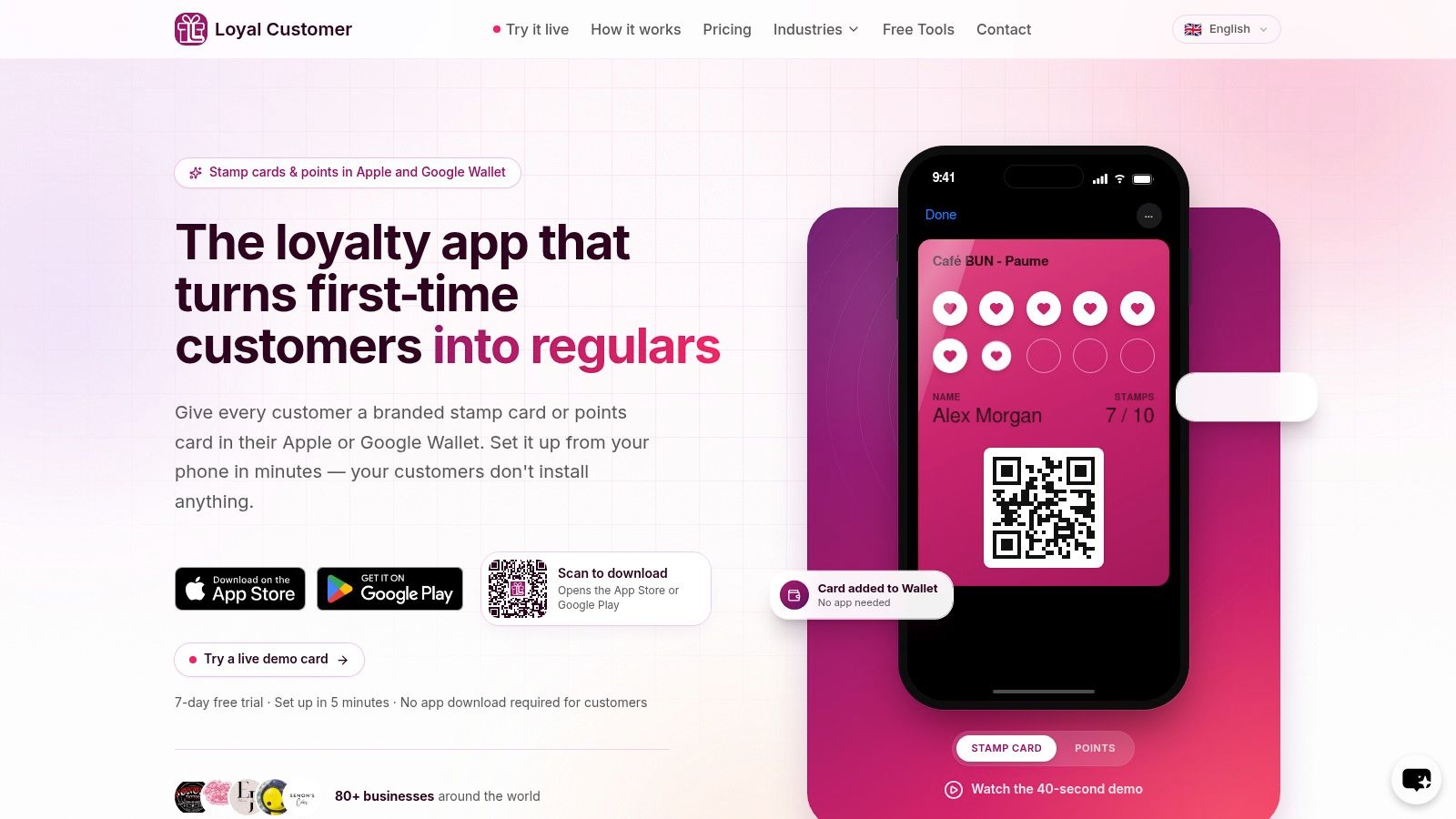
Businesses evaluating a lightweight workflow can review the Loyal Customer loyalty card demo as one example of a wallet-native approach.
Mapping Wallet Types to Loyalty Pass Use Cases
The same wallet pass can support very different loyalty mechanics. The merchant's first decision should be the program behavior, not the visual design.
Points-based loyalty cards
Points work well when transaction values vary or when the merchant wants flexible rewards. A customer might earn different amounts based on spend, product category, or promotion. The pass should display the current balance and a clear redemption condition, while the backend records the transaction and applies the rules.
The pass shouldn't be the authoritative ledger. If a customer sees an outdated balance, staff need a way to verify the backend before redeeming a reward.
Digital stamp cards
Stamps suit repeat visits with a simple completion rule, such as earning a reward after a defined number of qualifying purchases. They're easy for cafés, bakeries, and service businesses to explain because the customer understands the visual progress immediately.
The main operational risk is inconsistent issuance. Staff need a clear rule for what counts as a visit, whether multiple purchases earn multiple stamps, and how corrections are handled. A digital pass reduces lost cards and manual tallying, but it doesn't remove the need for transaction discipline.
Stored-value balances
Prepaid balances require more caution. A wallet that represents money for future purchases has different accounting, refund, dispute, and consumer-protection implications from a pass that displays points or stamps. The merchant should define where the funds are held, who owns the ledger, and which entity handles support before presenting the product as a wallet balance.
For many small loyalty programs, it's cleaner to keep monetary value outside the pass and use the wallet credential for identification or rewards.
Membership passes without stored value
A membership pass may show a customer's status, access rights, or renewal information without containing money. This is often the simplest wallet-native use case. Gyms, clubs, studios, and local organizations can use the pass as a persistent credential, with access decisions controlled by the merchant's system.
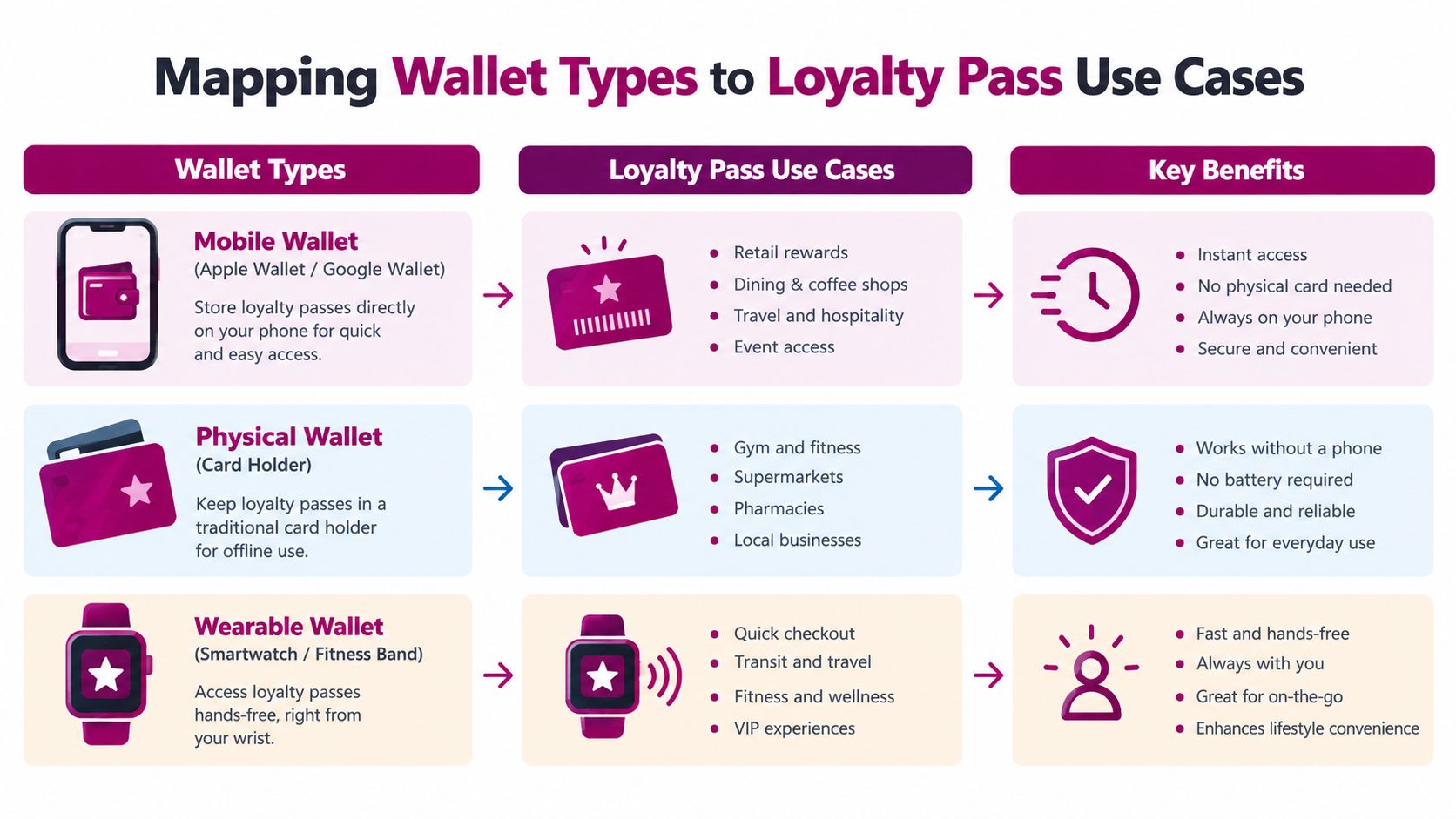
The practical design principle is consistent across all four scenarios. Use the wallet for convenient presentation, not as a substitute for a properly controlled loyalty backend. A phone-based platform such as Loyal Customer's wallet-ready loyalty workflow can support points and digital stamps through Apple Wallet and Google Wallet passes, while the program data remains managed by the merchant's loyalty system.
Adoption, Fragmentation, and the Customers You Still Cannot Reach
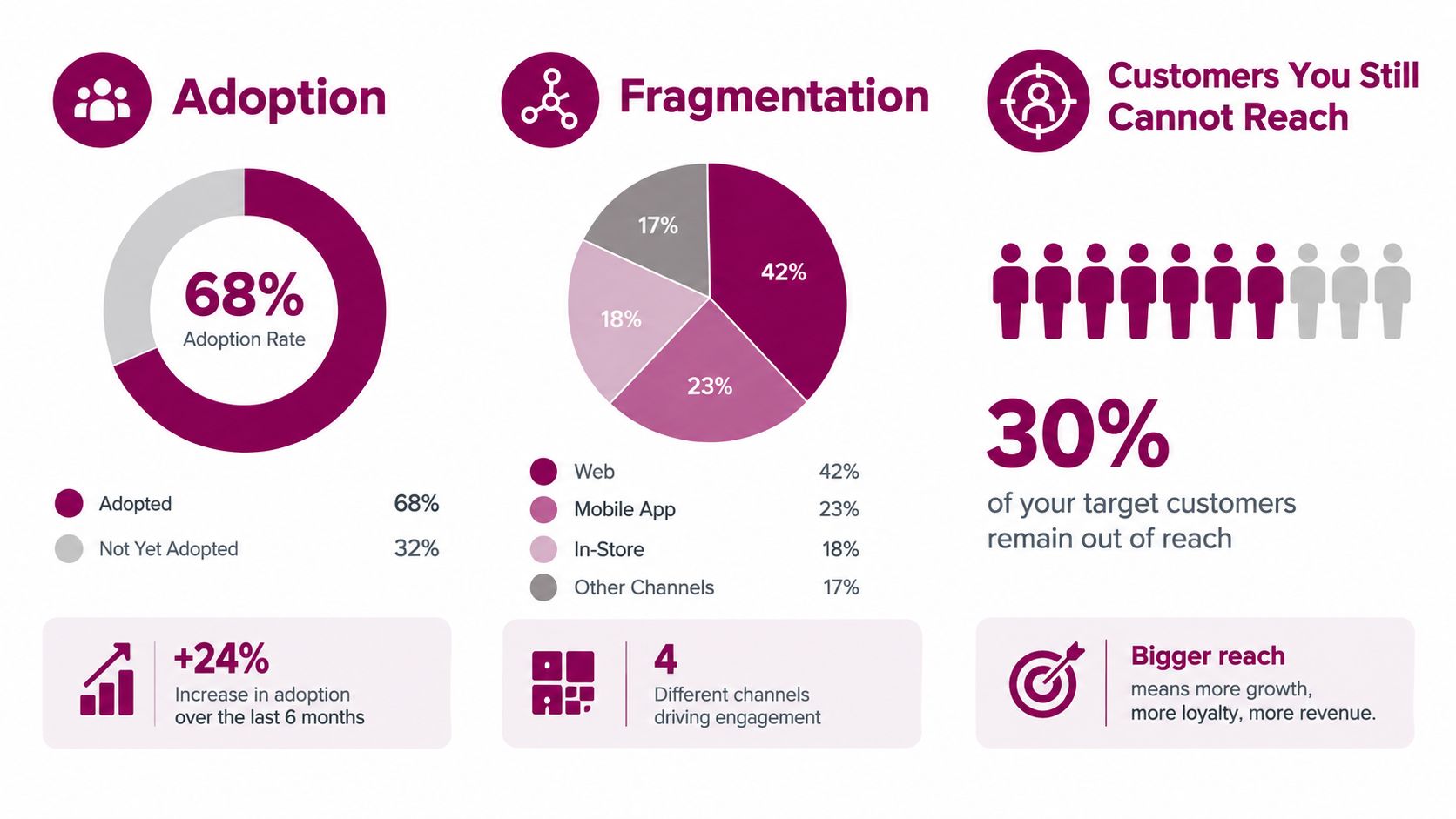
Wallet adoption is rising, yet a wallet pass still cannot reach every customer. In the United States, 52% of consumers used a digital wallet during the three months ending in Q4 2024, compared with 48% in 2023. 27% of non-users were unsure how to use one, according to the previously cited Consumer Reports research.
For merchants, the practical implication is clear: growing awareness does not remove the need for explanation, reassurance, or an alternative enrollment path. A pass may be technically available while remaining unfamiliar to part of the customer base.
Wallet choice also fragments the experience. ACI Worldwide reports that mobile-wallet payments increased 105% between 2019 and 2024. Over the same period, the number of consumers using two or three mobile wallets doubled, while the number using four or more increased tenfold.
Trust and accessibility remain part of the product
ACI's research also identifies a generational trust gap. 44% of older consumers remained unsure about mobile-wallet safety, compared with 23% of younger consumers. That difference affects onboarding: merchants need to state what the pass does, what it does not do, and why the customer should add it.
A loyalty pass generally does not ask customers to move money into a new financial account. It can identify the customer, show a reward balance, or display a QR code for staff to scan. Those functions may simplify adoption, but they do not eliminate the need for a fallback.
Keep a non-wallet route available. Staff can use a phone number, email address, physical card, or account lookup when a customer lacks a compatible device, has a dead battery, prefers another wallet, or does not want to install a pass.
Native-wallet distribution reduces app-download friction. It does not solve device coverage, trust, accessibility, or ecosystem barriers. A wallet-native loyalty program therefore works best as one participation route, not the only one.
Choosing the Right Program Model for a Wallet Pass
A wallet pass is only as useful as the loyalty mechanic behind it. Points and stamps can both work, but they solve different merchant problems.
Choose stamps when the purchase pattern is predictable. A coffee shop with a consistent repeat-visit behavior may benefit from a visible completion path. Customers understand the mechanic quickly, and staff can apply it with a simple scan or account action. The trade-off is limited flexibility. A stamp usually treats qualifying visits similarly, even when basket sizes vary.
Choose points when value and behavior vary. Points can reward different spend levels, product categories, or promotional actions. That gives the merchant more control, but it introduces more explanation, more opportunities for calculation errors, and a greater need for clear redemption rules.
Fraud risk exists in both models. Stamp programs need controls against duplicate issuance. Points programs need controls against inflated balances, manual adjustments, and unclear expiration policies. Neither model becomes trustworthy merely because the balance appears in a native wallet.
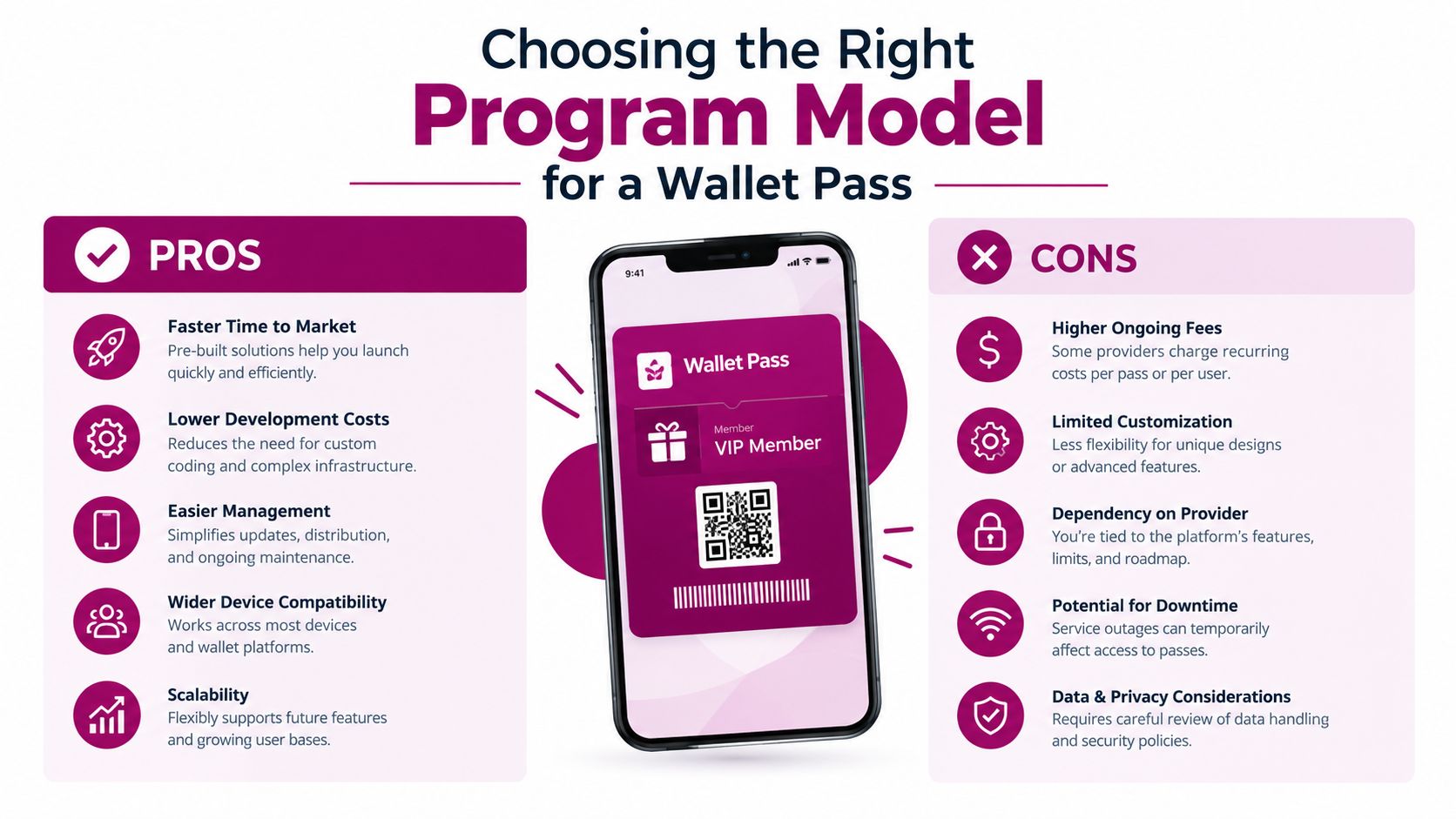
A useful selection rule is operational. If staff can explain the reward in one sentence and apply it consistently, stamps may be the better starting point. If the merchant needs transaction-size fairness, tiered rewards, or category-based incentives, points provide more room to design.
Before launch, document the enrollment, accrual, redemption, correction, and customer-support flows in a short operating guide such as this loyalty program launch playbook.
Which Wallet Should a Small Merchant Issue First
Cafés, bakeries, and tea shops often have a strong starting case for a digital stamp pass. Hair salons, beauty businesses, gyms, and independent retailers may benefit more from points or a membership credential, depending on whether purchase values vary and whether the pass needs to show status.
For a merchant serving both iPhone and Android customers, issue both Apple Wallet and Google Wallet passes when the operating workflow can support them. If resources are limited, start with the platform most common among existing customers, then add the other after staff can reliably enroll, update, and redeem the first pass.
A wallet pass isn't the right tool for every program. Avoid making it the center of the experience if customers need complex account management, detailed product browsing, social features, or advanced support workflows. A standalone application or web account may fit better, with the wallet used only as a shortcut or reminder.
Before launch, confirm three points:
- Which devices customers use.
- Whether points, stamps, membership, or stored value is the use case.
- How non-wallet customers will earn and redeem rewards.
Loyal Customer lets small businesses run points or digital stamp programs and issue wallet-ready loyalty cards for Apple Wallet and Google Wallet, without requiring customers to install a separate loyalty app. Visit Loyal Customer to test a wallet-native loyalty workflow and choose the program model that fits your customers.